
Road trips need a different kind of itinerary. You’re not flying to one destination and staying put — you’re moving every day, sometimes every few hours. The plan isn’t “what am I doing today?” It’s “where am I driving, how long will it take, and where am I sleeping tonight?”
This free road trip itinerary template — also usable as a road trip planner template — is built around driving legs, not days. Each section covers a stretch of your route: starting point, destination, distance, estimated drive time, planned stops along the way, and your overnight accommodation. It works whether you’re doing a three-day weekend trip or a cross-country month-long drive.
What’s in This Template
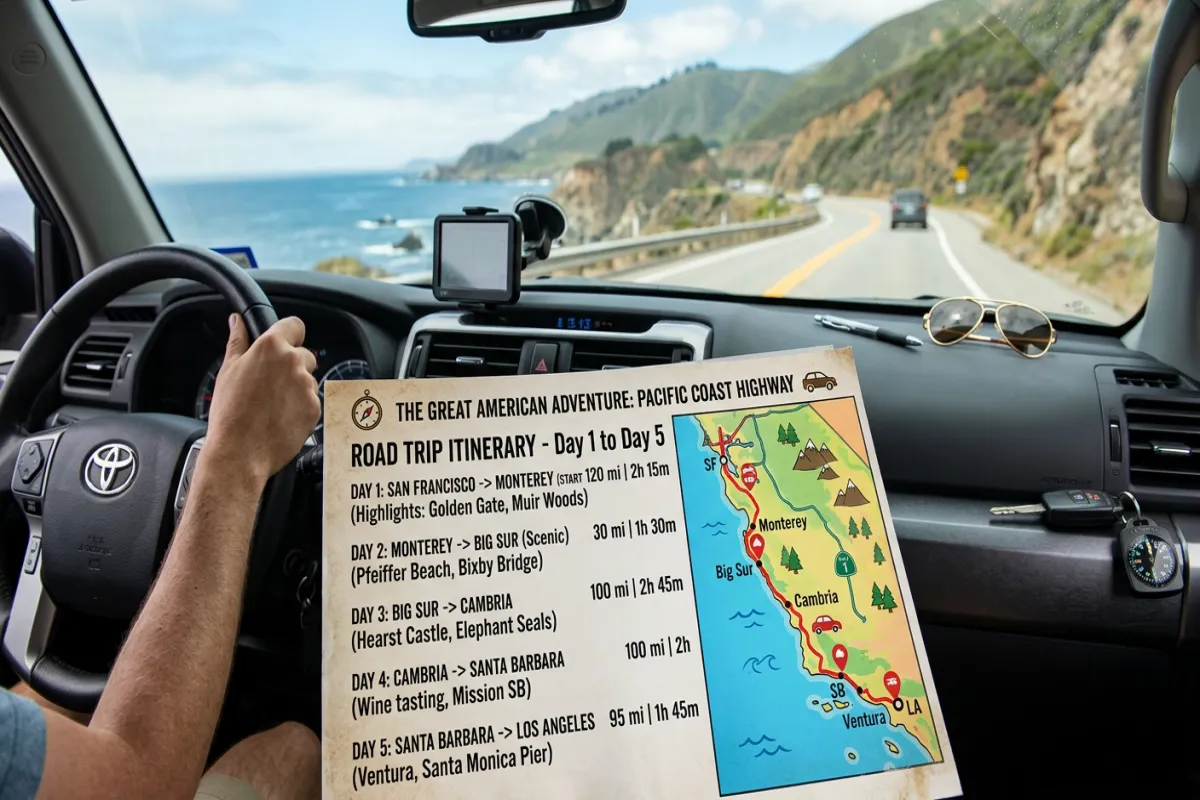
1. Route Overview
Your trip at a glance: starting city, ending city (or “loop back to start”), total distance, total estimated drive time, number of days, and number of overnight stops. Below that, a list of all your major waypoints in order — the backbone of your route that everything else hangs on.
2. Driving Legs
This is the core of the template. Each driving leg gets its own block with: departure point, departure time, arrival point, arrival time, distance, estimated drive time, highway/route numbers, and notes. The notes column is where you flag construction zones, toll roads, mountain passes, or “last gas station for 100 miles” warnings.
3. Planned Stops
Between driving legs, you’ll want to stop. This section logs each stop: location name, type (gas, food, sightseeing, restroom, photo op), address, estimated time there, hours of operation, cost, and whether a reservation is needed. It keeps you from blowing past that waterfall overlook because nobody wrote it down.
4. Overnight Accommodations
Every place you’re sleeping: city, property name (hotel, campsite, Airbnb, friend’s house), address, check-in time, check-out time, confirmation number, nightly rate, cancellation policy, and amenities notes (laundry, kitchen, pool, pet-friendly). One row per night.
5. Daily Schedule
Combines driving and stops into a single timeline for each day. Morning departure, mid-morning stop, afternoon driving leg, late-afternoon arrival, evening activity. Not every day needs to be packed — some days the schedule is just “drive four hours, set up camp, sit by a lake.”
6. Budget & Fuel Tracker
Categories specific to road trips: fuel (with estimated gallons and price per gallon), tolls, parking, accommodation, food, activities, vehicle maintenance (oil change before departure, roadside emergency kit), and a miscellaneous column for the souvenirs you swore you wouldn’t buy. Running totals per day and for the full trip.
7. Vehicle & Emergency Prep
Pre-trip vehicle checklist: oil level, tire pressure, tire tread, coolant, wiper fluid, spare tire, jack, jumper cables, first aid kit, flashlight, phone charger, paper maps as backup. Below that, emergency contacts: roadside assistance number (AAA or your insurer), your mechanic’s phone, and emergency contacts for each state or province you’re passing through.
Plan Your Trip Today!
Get a complete, personalized trip template in seconds.
Take full control to customize every detail. Or, skip the template and build your itinerary with AI
Plan My TripHow to Use It
- Plot your route first. Use Google Maps or Roadtrippers to plan your overall route, then transfer the waypoints into the Route Overview section. Don’t get granular yet — just major stops.
- Break it into driving legs. No leg should exceed 4-5 hours of driving without a meaningful stop. Long drives cause fatigue, and you’ll miss things worth seeing.
- Research stops between legs. Once you know your route, search for roadside attractions, scenic overlooks, diners, state parks, and rest areas between each driving leg. Add them to the Planned Stops section.
- Book accommodations along the route. In summer or near national parks, book early. In rural areas, options may be limited. The Overnight Accommodations section keeps all your confirmations in one place.
- Estimate fuel costs. Multiply total distance by your vehicle’s fuel consumption rate, then multiply by average gas price along your route. The Budget section has fields for this calculation.
- Export for offline use. Download as PDF before you leave — cell service on rural highways is unreliable. Use the Yopki Travel Document Organizer to merge your road trip plan with hotel confirmations and campsite reservations into one packet.
Road Trip Planning Tips
Build in buffer days. If your route takes five days of driving, plan for seven. You’ll discover places worth an extra few hours — or an extra night. A road trip with zero slack becomes a forced march. For a deeper dive, check out our road trip planning guide
Check your route for seasonal closures. Mountain passes, national park roads, and scenic byways often close seasonally. Verify every segment of your route is open during your travel dates. The National Park Service and state DOT websites have current closure info.
Pack a cooler. Food options on long highway stretches can be limited to gas station snacks. A cooler with sandwiches, fruit, and drinks saves money and keeps you from making bad decisions at mile 300.
Download offline maps. Google Maps lets you download regions for offline use. Do this for every area along your route before departure — especially rural stretches where you’ll lose signal.
Compared to Our Other Templates
- This Road Trip Itinerary — organized by driving legs and route stops. Best for multi-destination driving trips where the journey is part of the experience.
- Travel Planner — comprehensive trip planner covering flights, hotels, budget, and packing. Best for fly-in trips to a single destination.
- Vacation Itinerary — simplified day-by-day schedule. Best for relaxed single-destination vacations.
- Travel Itinerary (Google Docs) — standard day-by-day itinerary with flights and hotels. Best for general travel planning.
- Weekend Itinerary — compact two-to-three-day plan. Best for quick getaways.
How to Plan a Road Trip
Planning a road trip comes down to four decisions: where you’re going, which route you’re taking, where you’re stopping, and where you’re sleeping. Start by pinning your must-visit destinations on a map. Then connect them with a route that balances driving time against scenic value — the fastest route isn’t always the best route.
Use Google Maps trip planner or Roadtrippers to estimate total distance and drive time. Break the route into legs of 3-5 hours each. Research stops between legs: gas stations, restaurants, scenic overlooks, and rest areas. Book accommodation for at least the first and last nights. For everything in between, this road trip planner template keeps all those details organized in one place so nothing falls through the cracks.
FAQ
How do you plan a road trip route?
Start by listing your must-visit destinations, then use Google Maps or Roadtrippers to connect them into a logical route. Break the total drive into legs of 3-5 hours each, research stops between legs (fuel, food, sightseeing), and book accommodations along the way. Transfer your route into this template so every driving leg, stop, and overnight is documented in one place.
How do I estimate drive times accurately?
Google Maps gives good baseline estimates, but add 15-20% for stops, traffic, and slower-than-expected roads. For mountain or rural routes, add even more. A “4-hour drive” with two quick stops and one gas fill is really 5 hours.
Should I book all accommodations in advance?
Book the first and last nights, plus any nights near popular destinations (national parks, beach towns in summer). For other nights, you can leave some flexibility — especially if you’re open to campgrounds or last-minute hotel apps. Just don’t leave it fully open during peak season.
Can I use this for an RV or campervan trip?
Yes. The template works for any vehicle. For RV trips, use the Vehicle Prep section to add RV-specific checks (propane, water tanks, generator, leveling blocks) and add campground hookup details (electric, water, sewer) to the Overnight Accommodations notes column.