
Our Travel Planner is the most comprehensive template we offer — covering everything from initial research through packing. This is the Excel version: a downloadable .xlsx workbook with the same eight-section structure, rebuilt with Excel formulas, data validation dropdowns, and conditional formatting for offline use.
If you plan trips in Microsoft Excel, prefer offline access, or work in an environment that uses Microsoft Office, this template gives you the full travel planner experience without needing Google Workspace.
What’s in This Template
Tab 1: Planning Dashboard
Mission control for your trip: destination, dates, trip duration (auto-calculated), travel companions, total budget, and a countdown formula showing days until departure. Below that, a pre-trip task checklist with conditional formatting — completed tasks turn green, overdue tasks turn red. Tasks include: passport check, visa application, travel insurance, vaccinations, bank notification, pet sitter, mail hold, and auto-pay setup.
Tab 2: Research & Booking
Compare options before booking: item (flights, hotels, tours, car rental), option A vs. B vs. C, price, pros and cons, a “booked?” dropdown, and confirmation number once booked. This tab replaces the scattered browser tabs and note files from your research phase. Conditional formatting highlights the cheapest option in each row.
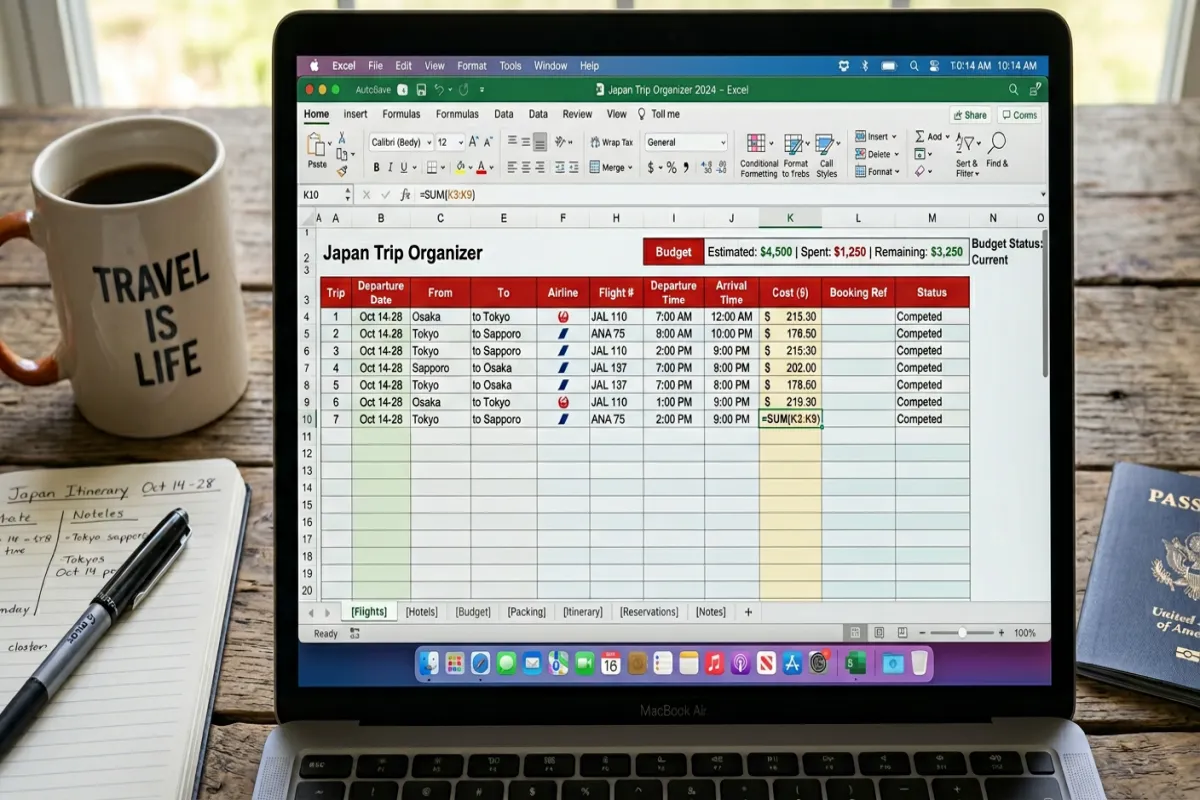
Tab 3: Flights & Transportation
Every travel leg with full details: airline, flight number, route, times, terminal, gate, seat, confirmation code, baggage allowance, and cost. Additional rows for trains, buses, ferries, rental cars, and airport transfers. Status dropdown (researching, booked, confirmed, checked in, completed). Subtotal formula at the bottom.
Tab 4: Accommodation
All lodging: property name, type, address, check-in and check-out, number of nights (auto-calculated), nightly rate, total cost (formula), confirmation number, cancellation deadline, and amenity notes. Cancellation deadline formatting turns the cell yellow when it’s within 14 days and red when it’s within 3 days.
Tab 5: Day-by-Day Itinerary
Your daily schedule: date, day of week (auto-calculated), time blocks from morning to evening with activity, location, address, reservation info, estimated cost, and notes. Cost column feeds into the Budget tab. Expandable row groups let you collapse completed days.
Tab 6: Budget Planner
Comprehensive budget tracking: set budgets by category, log actual spending, and watch variance update automatically. Categories: flights, accommodation, food, activities, transportation, shopping, insurance, and emergency fund. A chart visualizes budget vs. actual by category. Running totals show overall budget health.
Tab 7: Packing List
Categorized checklist: documents and money, electronics, clothing, toiletries, health and medicine, and trip-specific gear. Checkbox column with a completion percentage formula at the top. Filter by “not packed” to see remaining items. Bag weight tracker at the bottom for airline baggage limit compliance.
Tab 8: Contacts & Documents
Emergency contacts, embassy info, travel insurance details, airline and hotel customer service numbers, and a digital document reference (links to where your passport photo, insurance card, and credit card copies are stored). The “in case of emergency” page you hope you never need but will be glad you have.
Plan Your Trip Today!
Get a complete, personalized trip template in seconds.
For more details, see our complete trip planning guide.
Take full control to customize every detail. Or, skip the template and build your itinerary with AI
Plan My TripHow to Use It
- Download and save. Works in Excel 2016+, LibreOffice Calc, and Apple Numbers. Keep a copy of the blank template so you can reuse it for future trips.
- Start with the Planning Dashboard. Fill in trip basics and work through the pre-trip checklist. The checklist is sequenced to catch time-sensitive items (passport renewal, visa applications) early.
- Use Research & Booking during the comparison phase. Before you commit to any flights or hotels, log your options here. The side-by-side comparison prevents impulsive booking.
- Fill in tabs as you book. Move from Research to Flights to Accommodation as each element gets confirmed. By the time you’re building the Day-by-Day Itinerary, your logistical foundation is set.
- Export before departure. Print or save as PDF. Use the Yopki Travel Document Organizer to merge your itinerary with all booking confirmations into one travel packet.
Why the Excel Version?
Formulas and formatting. Excel’s formula engine, conditional formatting, and data validation dropdowns create a more interactive planning experience than a document. Cancellation deadlines highlight automatically. Budget cells change color when you’re over budget. Dropdown menus keep category entries consistent.
Offline reliability. No internet dependency. The file works on a plane, in a cabin, or in a country with unreliable Wi-Fi.
Corporate compatibility. If your workplace runs Microsoft Office, this integrates natively. Useful for trips that mix business and personal travel.
All Travel Planner Formats
- This Excel Version — full eight-tab planner with formulas. Best for offline, Microsoft Office environments.
- Google Docs Version — the original travel planner in document format. Best for sharing and collaboration.
- Trip Planning Spreadsheet (Google Sheets) — six-tab cloud-based version. Best for real-time collaboration.
- See All Templates — browse every format and trip type.
FAQ
How do I make a trip planner in Excel?
Create a workbook with tabs for each planning phase: research and booking comparison, flights and transportation, accommodation, daily itinerary, budget, packing list, and emergency contacts. Use data validation dropdowns for status fields (researching, booked, confirmed). Add conditional formatting to highlight approaching deadlines. Use formulas for budget calculations and trip duration. This template has all eight tabs pre-built with formulas, formatting, and structure — download it and start filling in your trip details.
How is this different from the Travel Itinerary Excel template?
The Travel Itinerary (Excel) focuses on the trip itself — flights, hotels, and daily schedule. This Travel Planner (Excel) covers the entire planning lifecycle from research and booking through itinerary, budget, packing, and emergency contacts. Use the Itinerary if you’ve already planned everything and just need to organize your schedule. Use this Planner if you’re starting from scratch.
Can I share this with co-travelers?
Yes. Email the .xlsx file, or save it to OneDrive or SharePoint and use Excel’s co-authoring feature for real-time collaboration. For smoother real-time sharing, the Google Sheets version may be easier.
What if I need more rows in a section?
Insert rows within the existing table ranges so formulas auto-expand. The template includes enough rows for a 14-day international trip by default. For longer trips, just add rows as needed.