Not every trip needs a project management tool. A week at the beach, a long weekend getaway, a family vacation to a resort — these trips need a simple plan, not a 47-tab spreadsheet.
This vacation itinerary template strips out the complexity and gives you just the sections that matter for a leisure trip. Fill it in, share it with whoever you’re traveling with, and get back to being excited about your vacation.
What’s in This Template
Trip Snapshot. One block at the top with your destination, dates, time zone, hotel name and address, and your confirmation numbers for the big-ticket bookings (flights, hotel, rental car). Everything a TSA agent, hotel receptionist, or rental car desk needs from you — all on page one.
Travel Day Details. Your outbound and return flights laid out clearly: airline, flight number, departure and arrival times, airports, terminals, and seat numbers. If you’re driving instead of flying, this section has fields for route, estimated drive time, and planned stops.
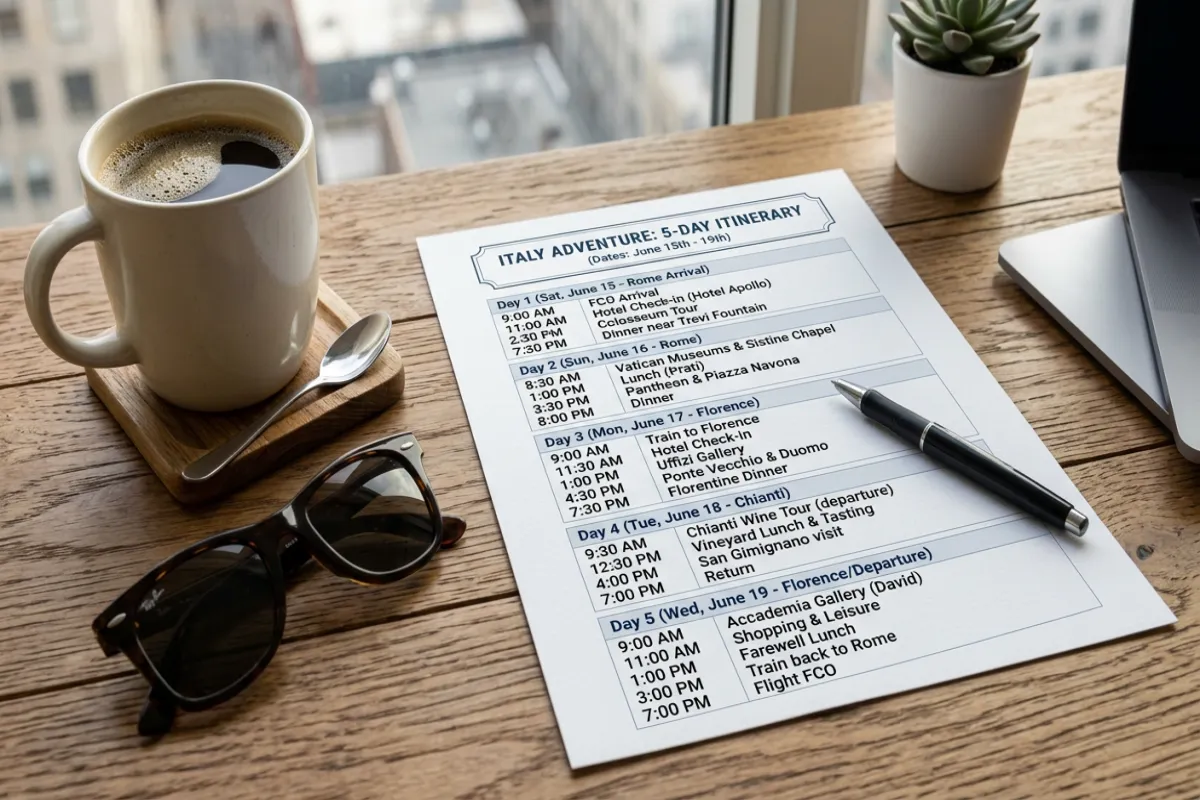
Daily Plans. A simple day-by-day layout with morning, afternoon, and evening blocks. No hour-by-hour micromanagement — just a general idea of what each day looks like. “Tuesday: beach morning, old town walk afternoon, seafood dinner at La Marina (7pm, reservation confirmed).” That’s the right level of detail for a vacation.
Restaurant List. A short table for places you want to eat. Name, cuisine, whether you need a reservation, and whether you’ve booked it. Keeps your food plans organized without overcomplicating things.
Packing Checklist. A vacation-specific packing list covering clothes, toiletries, beach/pool gear, electronics, documents, and medicines. Uses checkboxes so you can tick items off as you pack.
Emergency Info. Hotel phone number, local emergency number, nearest hospital, embassy or consulate (for international trips), and your travel insurance details. You probably won’t need this section. You’ll be very glad it’s there if you do.
Plan Your Trip Today!
Get a complete, personalized trip template in seconds.
Take full control to customize every detail. Or, skip the template and build your itinerary with AI
Plan My TripHow to Use It
- Pick your format. This template is available as a Google Doc (best for sharing and collaboration) and as a printable PDF (best for offline use). Choose the format that fits how you travel.
- Copy or download. For Google Docs: click the link, then File → Make a copy. For PDF: download and print, or fill it in digitally.
- Fill in the essentials first. Start with the Trip Snapshot and Travel Day sections. These have your confirmation numbers and logistics — the things you’ll actually reference during your trip.
- Add daily plans loosely. Vacation planning should feel fun, not like homework. Jot down the activities and restaurants you’re excited about. Leave gaps for spontaneity. The best vacation moments are usually unplanned.
- Share with your travel group. If using Google Docs, click Share and add your companions. If using the PDF, email or AirDrop it. Everyone should have a copy of the essentials before departure.
Vacation Itinerary vs. Full Travel Itinerary
This template is intentionally simpler than our full travel itinerary template. Here’s how to choose:
Use this vacation template if you’re planning a relaxed trip to one destination, staying at one or two hotels, and your daily plans are flexible. Beach vacations, resort stays, weekend getaways, and family holidays are perfect for this format.
Use the full itinerary template if you’re doing a multi-city trip, have lots of pre-booked activities with specific times, need detailed budget tracking, or are traveling with a large group that needs to coordinate logistics. Our Google Docs itinerary or Google Sheets itinerary handle that level of complexity better.
Making It Printable
A printed vacation itinerary is underrated. Fold it into your passport holder or toss it in your carry-on. When your phone dies at the airport or you can’t get data at your destination, a piece of paper with your hotel address and confirmation number is worth its weight in gold.
To get the best printable version, export your completed itinerary as a PDF (File → Download → PDF in Google Docs). For an even better travel packet, use the Yopki Travel Document Organizer to combine your itinerary with your flight confirmations, hotel booking, and insurance card into one document. Print that, and you’ve got everything you need in one place.
Vacation Planning Tips
Book the things that sell out. Leave the rest flexible. Restaurant reservations at popular spots, guided tours with limited capacity, and attraction tickets with timed entry — book these in advance. Everything else can be decided day-of based on how you feel, the weather, or recommendations from locals. For a deeper dive, check out our complete trip planning guide
Build in at least one “nothing” day. The best vacations include time with no plans at all. A morning where you sleep in, wander to a café, and see where the day takes you. Your itinerary should have space for this — it’s not wasted time, it’s the whole point of vacation.
Save your confirmation emails in one place. Before your trip, forward all booking confirmations to a single email folder or save the PDFs to a Google Drive folder. When the hotel front desk asks for your confirmation number and you’re jet-lagged at 11pm, you’ll find it in seconds instead of scrolling through months of email.
FAQ
Is this template free?
Yes, completely free. No signup, no email required, no premium version. Copy it and use it for every trip.
Can I use this for a road trip?
Absolutely. The Travel Day section works for driving trips — just fill in your route, estimated drive times, and planned stops instead of flight details. The daily plans section works the same way regardless of how you get to your destination.
What if I’m going to multiple destinations?
For multi-destination trips, you’ll get more mileage from our full travel itinerary template, which has more structure for tracking multiple hotels, transportation between cities, and a detailed day-by-day format. This vacation template works best for single-destination trips.