If you’re planning a relaxed vacation and prefer Excel over Google Sheets, this vacation planner template is the simplified offline version of our Vacation Itinerary. It’s designed for leisure trips — beach vacations, resort stays, city breaks — where you don’t need the full complexity of a travel planner but want more structure than a notes app.
Download the .xlsx file, save it to your computer, and plan your vacation without needing internet access, a Google account, or any subscriptions.
What’s in This Template
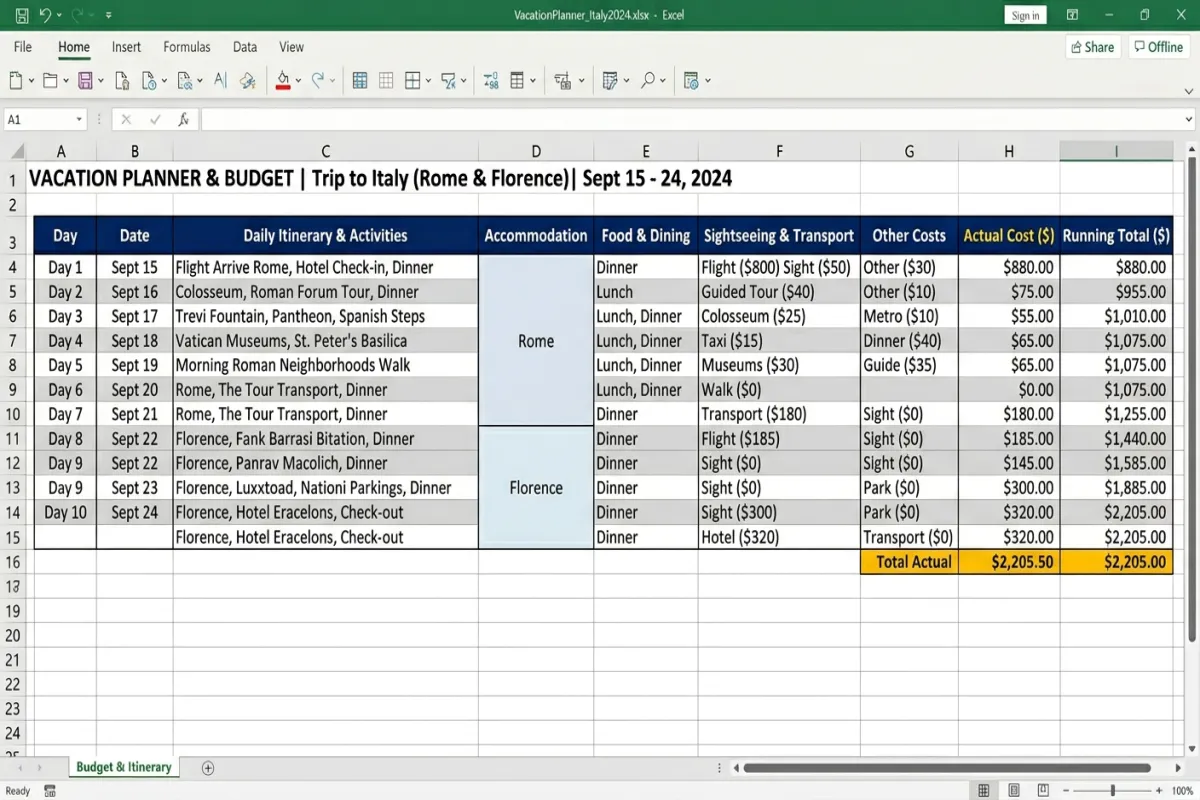
Tab 1: Trip Overview
Destination, travel dates, travelers, accommodation name and address, and a quick-reference section for your most important confirmation numbers. A summary row pulls your total budget and spending from the Budget tab so you can see your financial status at a glance.
Tab 2: Day-by-Day Schedule
Relaxed daily planning: date, morning plan, afternoon plan, evening plan, restaurant reservations, and notes. Unlike a business or multi-city template, this doesn’t break days into strict time blocks. A morning entry might just say “beach” and the afternoon might say “explore old town.” It matches the pace of an actual vacation.
Tab 3: Hotels & Flights
Flight details (airline, times, confirmation number) and accommodation info (hotel name, dates, rate, confirmation) in one tab. For a straightforward vacation, you typically have one outbound flight, one return flight, and one hotel — this tab handles that without extra complexity.
Tab 4: Budget Tracker
Pre-trip budget setting by category (flights, hotel, food, activities, shopping, other) with formulas that calculate your remaining budget as you log expenses. A daily spending section lets you enter each purchase and the template categorizes and totals everything. Simple enough for a vacation, detailed enough to prevent overspending.
Tab 5: Packing List
Vacation-specific packing: swimwear, sunscreen, sandals, camera, books, and other leisure items alongside the essentials. Checkbox column for tracking. Shorter than a full travel packing list because a vacation to a resort doesn’t need the same prep as a three-country backpacking trip. For a deeper dive, check out our complete trip planning guide
Plan Your Trip Today!
Get a complete, personalized trip template in seconds.
Take full control to customize every detail. Or, skip the template and build your itinerary with AI
Plan My TripHow to Use It
- Download and save. Works in Excel 2016+, LibreOffice Calc, and Apple Numbers. Save locally for offline access.
- Fill in Trip Overview and Hotels & Flights first. These are your fixed elements — everything else builds around them.
- Keep the Day-by-Day Schedule loose. This is a vacation, not a business trip. Fill in reservations and must-do activities, and leave the rest open for spontaneity.
- Set your budget before you go. Enter category budgets in the Budget Tracker tab and log spending daily during the trip.
- Print or export as PDF. Use the Yopki Travel Document Organizer to merge your itinerary with booking confirmations.
All Vacation Itinerary Formats
- This Excel Version — offline spreadsheet with budget formulas. Best for Microsoft Office users and offline planning.
- Google Docs Version — the original vacation itinerary in document format. Best for simplicity and sharing.
- Google Sheets Itinerary — more detailed spreadsheet version with full itinerary features. Best for collaborative planning.
- Full Travel Itinerary (Excel) — more comprehensive Excel template for complex trips. Best if your vacation needs detailed logistics.
- See All Templates — browse every format and trip type.
FAQ
How do I create a vacation itinerary in Excel?
Open Excel and create tabs for your trip overview, daily schedule, hotels and flights, budget, and packing list. In the daily schedule tab, create rows for each day with columns for morning, afternoon, and evening plans. Add your hotel and flight confirmation numbers in a separate tab. Use simple SUM formulas in the budget tab to track spending. Or save time by downloading this template — it has five tabs pre-formatted with formulas ready to fill in.
How is this different from the full Travel Itinerary Excel template?
The Travel Itinerary Excel template has six tabs covering detailed day-by-day scheduling, comprehensive flight tracking, accommodation management, and advanced budget formulas. This Vacation Itinerary Excel template has five simpler tabs designed for leisure trips where you don’t need that level of detail. Think of this as the relaxed version.
Can I add more days to the schedule?
Yes. Insert rows in the Day-by-Day Schedule tab. If you’re extending beyond 10 days, consider switching to the full Travel Itinerary Excel template which has more structure for longer trips.
Does this work on a Mac?
Yes. The .xlsx file opens in Microsoft Excel for Mac, Apple Numbers, and LibreOffice Calc. All formulas and formatting are compatible. Some conditional formatting may look slightly different in Numbers.