ChatGPT vs Travel Apps: Which Plans Better Trips?
Since ChatGPT launched, millions of people have used it to plan trips. Type “plan me a 5-day trip to Rome” and you get a detailed day-by-day outline in seconds. It feels like magic, at least until you try to actually use that plan on your trip and realize it is a wall of text with no map, no bookings, and a restaurant suggestion that closed two years ago.
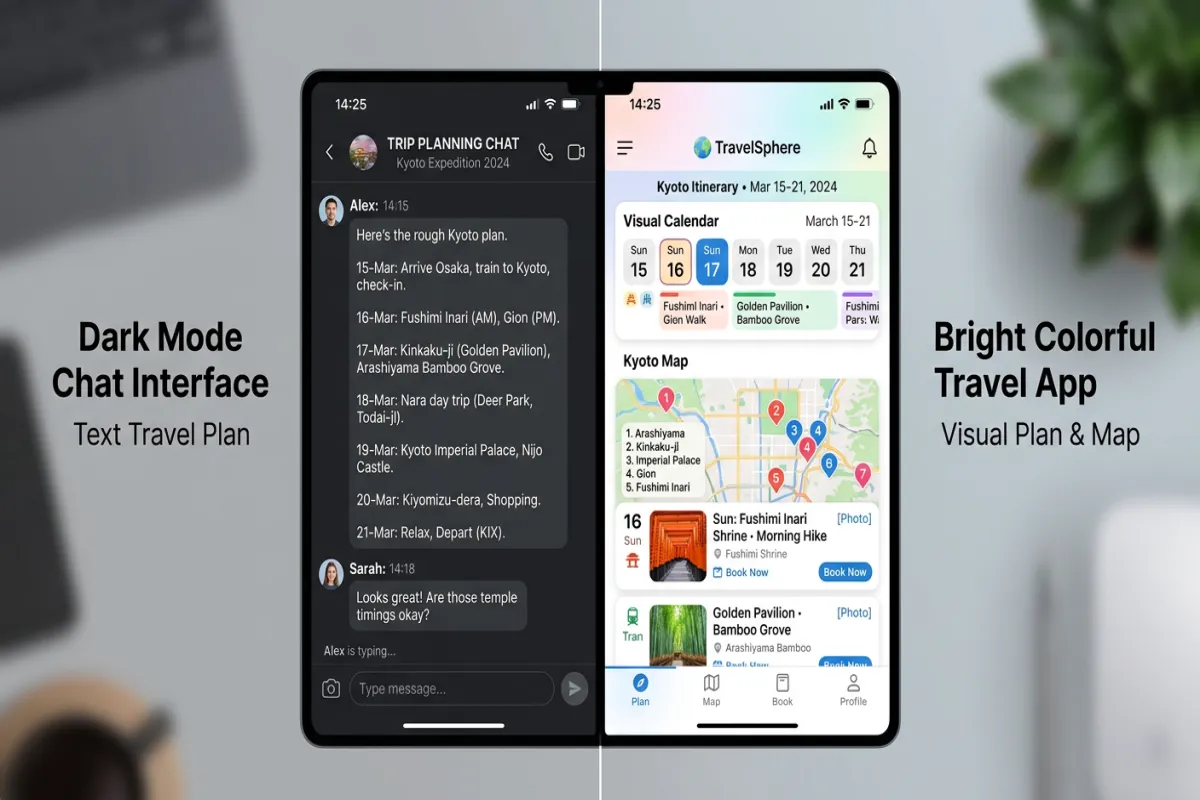
This is not a ChatGPT hit piece. AI chat tools are genuinely useful for certain parts of travel planning. But they are not a replacement for dedicated travel planning tools, and understanding where each shines helps you use both more effectively.
What ChatGPT Does Well
ChatGPT’s strengths align with the early, creative phase of trip planning, when you are figuring out where to go, what to do, and how to structure your time.
Brainstorming Destinations
“Where should I go for a 4-day weekend in March with a $1,500 budget and warm weather?” This is where ChatGPT excels. It can consider multiple variables simultaneously and suggest destinations you might not have considered. Ask it to compare three options side by side and it will lay out pros, cons, weather expectations, and approximate costs for each.
Activity Research
“What are the best things to do in Lisbon for someone who likes food, history, and street art?” ChatGPT gives you a solid list of neighborhoods, restaurants, markets, and landmarks tailored to your interests. It can suggest hidden gems, explain which activities are worth the money, and help you understand how a city is laid out.
Restaurant Recommendations
Ask for restaurant suggestions by cuisine type, price range, neighborhood, and vibe, and ChatGPT delivers. It can explain what makes each spot worth visiting and suggest dishes to try. Keep in mind that some recommendations may be outdated, but the general quality of its restaurant knowledge is strong for well-known destinations.
Day-by-Day Outlines
“Create a 5-day Rome itinerary for a couple who loves history and food but does not want to rush.” ChatGPT produces a structured day-by-day plan with morning, afternoon, and evening suggestions. It logically groups activities by neighborhood to minimize transit time and balances busy sightseeing days with slower-paced ones.
Answering Specific Questions
ChatGPT handles the countless micro-questions that come up during planning:
- “Do I need a visa for Thailand as a US citizen?”
- “Is it safe to walk around Barcelona at night?”
- “What is the best way to get from the Rome airport to the city center?”
- “How much should I budget per day in Japan?”
- “What is the tipping etiquette in Iceland?”
For these research-style questions, ChatGPT is faster and more conversational than Google, though you should still verify critical information like visa requirements against official sources.
Where ChatGPT Falls Short
The weaknesses show up when you try to move from “planning ideas” to “an actual usable trip plan.” This is where the gap between an AI chat interface and a purpose-built travel tool becomes obvious.
No Visual Calendar
ChatGPT gives you text. A numbered list of activities for each day, maybe with timestamps. But travel planning is inherently visual and spatial. You need to see how activities fit together across a day, identify scheduling conflicts, and understand geographic relationships between stops. A text list does not do this.
When you see your Tuesday in a visual calendar with time blocks, you immediately notice that you scheduled a museum visit and a food tour at the same time, or that your 6:00 PM dinner is 45 minutes from your 5:30 PM activity. In a text list, these conflicts hide.
No Map View
ChatGPT can tell you that the Colosseum and the Roman Forum are near each other, but it cannot show you. A map view reveals that your morning activity is on the opposite side of the city from your lunch restaurant, or that three of your afternoon stops are within walking distance of each other. Geography matters in trip planning, and text-only tools miss it entirely.
No Real-Time Data
ChatGPT cannot check if a restaurant is still open, if a hotel has availability on your dates, what flights cost right now, or what the weather forecast looks like for next week. Its training data has a cutoff, and even with web browsing enabled, it does not connect to booking platforms, reservation systems, or live pricing engines.
This means ChatGPT might:
- Recommend a restaurant that closed last year
- Suggest a hotel without knowing its current price
- Recommend visiting a seasonal attraction that is closed during your travel dates
- Not know about recent construction, renovations, or temporary closures
No Booking Integration
ChatGPT cannot book anything. It can suggest flights, hotels, and activities, but you still need to open separate tabs, search for each item, compare prices, and book everything manually. Dedicated travel tools either integrate with booking platforms directly or let you attach confirmation details to itinerary items so everything stays organized.
No Collaboration
If you are planning a trip with other people, ChatGPT is a single-player tool. You get text output that you then need to copy, paste, and share through email, Google Docs, or a messaging app. Your travel companions cannot comment on the plan, suggest changes, or add their own preferences within the same interface.
For group trips, family vacations, or any trip with more than one person involved, the lack of collaboration is a significant limitation.
Hallucinations
ChatGPT sometimes confidently generates information that is wrong. In travel planning, this means it might:
- Invent a restaurant that does not exist
- Provide incorrect opening hours
- Suggest a bus route that was discontinued
- Recommend a “famous local dish” that locals have never heard of
- Give wrong visa information for your nationality
These errors are not common, but they happen often enough that you should verify any critical information independently.
What Dedicated Travel Apps Do Better
Travel planning apps like Yopki are built specifically for the problem ChatGPT is not designed to solve: turning ideas into an organized, visual, shareable, and executable trip plan.
Visual Calendar and Timeline
See your entire trip laid out with time blocks for each activity, meal, and transit period. Drag and drop to rearrange. Spot scheduling conflicts immediately. Understand how each day flows from morning to night.
Map Integration
Every activity is pinned on a map. See how your daily stops relate to each other geographically. Optimize routes to avoid backtracking. Discover nearby restaurants and attractions you might have missed.
Real-Time Information
Current opening hours, live pricing for activities and restaurants, weather forecasts for your travel dates, and up-to-date reviews. No guessing whether a place is still open.
Document Organization
Attach booking confirmations, e-tickets, reservation codes, and travel documents directly to the relevant itinerary item. No more searching your email for the hotel confirmation when you are standing at the check-in desk.
Group Collaboration
Share the itinerary with your travel group. Everyone sees the same plan, can suggest activities, leave comments, and see real-time updates. Changes sync instantly. No more emailing updated PDFs or losing information in group chats.
Offline Access
Access your full itinerary without internet. Maps, reservation details, and daily plans are available offline on your phone. This matters in areas with poor cell service, on airplanes, and in foreign countries where data plans may be limited.
Side-by-Side Test: Plan a 4-Day Trip to Barcelona
To illustrate the practical differences, here is what happens when you ask both ChatGPT and a travel app to plan the same trip.
The Request
“Plan a 4-day trip to Barcelona for a couple in their 30s who enjoy food, architecture, and beach time. Budget: mid-range. Dates: early October.”
ChatGPT Output
ChatGPT produces a well-structured day-by-day text outline in about 15 seconds:
- Day 1: Gothic Quarter, La Boqueria market, dinner at a recommended tapas spot
- Day 2: Sagrada Familia, Park Guell, El Born neighborhood
- Day 3: Barceloneta Beach morning, Picasso Museum, cooking class
- Day 4: Montjuic, cable car, farewell dinner at a seafood restaurant
The suggestions are solid. The neighborhood clustering is logical. But it is a text list with no times, no map, no reservation links, and no way to share it with your travel partner as a collaborative plan.
Travel App Output (Yopki)
Building the same trip in Yopki takes a few more minutes, but the result is a visual calendar with:
- Time blocks for each activity with duration estimates
- All locations pinned on a map, showing you that Day 2’s plan requires crossing the city twice (fixable by swapping afternoon activities)
- Restaurant options with current ratings, hours, and the ability to save your booking confirmation once you make a reservation
- Sharing via a link, so your travel partner can see the plan, suggest changes, and add their own preferences
- A document folder where you attach flight confirmations, hotel booking, and cooking class receipt
- Weather context showing early October in Barcelona is 68-75 degrees with low rain probability
The Verdict
ChatGPT wins the brainstorming phase. It generates ideas faster and handles open-ended questions better. The travel app wins everything after brainstorming: organization, visualization, collaboration, and execution. They are different tools for different phases of the same process.
The Best Approach: Use Both
The smartest travelers use ChatGPT and a travel app together. Here is the workflow:
Phase 1: Brainstorm with ChatGPT
- Compare destination options for your dates and budget
- Get activity suggestions tailored to your interests
- Ask for restaurant recommendations by neighborhood and cuisine
- Request a rough day-by-day outline to use as a starting framework
- Ask specific questions about logistics, customs, and transportation
Phase 2: Build in a Travel App
- Take ChatGPT’s suggestions and build them into a visual itinerary on Yopki
- Add time blocks and check for scheduling conflicts
- View everything on a map and optimize routes
- Verify that recommended places are still open with current information
- Make reservations and attach confirmations to itinerary items
- Share the plan with your travel companions
Phase 3: Execute and Adjust
- Use the travel app during the trip for the daily schedule, map navigation, and reservation details
- Use ChatGPT for on-the-go questions: “It is raining in Barcelona, what indoor activities are near Eixample?” or “We want to change our dinner plan, suggest a seafood restaurant near the port”
- Update the itinerary in the app so your travel group sees changes in real time
When ChatGPT Is Enough on Its Own
For some trips, ChatGPT alone may be all you need:
- Solo trips where you prefer spontaneity. A rough outline from ChatGPT gives you direction without over-committing.
- Short, simple trips. A weekend getaway to a city you know reasonably well might not need a visual calendar.
- Research-only phases. If you are still deciding whether to take a trip at all, ChatGPT can help you evaluate options without committing to a planning tool.
When You Need a Dedicated App
- Group trips. Collaboration features are essential when multiple people need to see and contribute to the plan.
- Complex multi-city or multi-week trips. Once you have more than 3-4 days of activities, a text list becomes unmanageable.
- Trips with many bookings. Flights, hotels, tours, restaurant reservations, and event tickets need to be organized and accessible.
- International travel. You need offline access, document storage, and a plan you can reference without cell service.
- Family trips or trips with specific logistics. When timing, coordination, and backup plans matter, visual tools prevent mistakes.
The Future of AI in Travel Planning
AI tools are improving rapidly. ChatGPT and similar models will eventually integrate with booking platforms, access real-time data more reliably, and offer visual outputs. But the core distinction will likely persist: AI excels at generating ideas and answering questions, while structured tools excel at organizing and executing plans.
The travelers who get the best results today are the ones using both. Let AI do what it does best (think), and let dedicated tools do what they do best (organize).
Frequently Asked Questions
Can ChatGPT plan a trip?
ChatGPT can brainstorm destinations, suggest activities, and draft rough itinerary outlines. It cannot create visual calendars, book anything, check real-time availability, or provide a shareable plan. It works best as a research tool in the early planning stages.
Is ChatGPT good for travel planning?
It is excellent for brainstorming and research. It falls short on organization, visualization, collaboration, and execution. Use it for ideas, then build the actual plan in a dedicated travel app like Yopki.
What are the limitations of using ChatGPT for travel?
Outdated information, no real-time data, text-only output, no booking capability, no collaboration features, and occasional hallucinations where it recommends places that do not exist. Always verify critical information.
What is better than ChatGPT for trip planning?
Dedicated travel apps (Yopki, Wanderlog, TripIt) are better for building and managing itineraries. Google Maps is better for route planning. Booking platforms are better for price comparison. The best approach combines ChatGPT with a dedicated app.
How do you use ChatGPT and a travel app together?
Use ChatGPT first to brainstorm destinations, activities, and restaurants. Then take those ideas into a travel app like Yopki to build a visual, shareable, bookable itinerary. Use ChatGPT again during the trip for on-the-go questions and backup suggestions.
Ready to turn your ChatGPT brainstorm into a real trip plan? Yopki picks up where AI chat leaves off. Build a visual itinerary, add your bookings, and share it with your travel group, all in one place.