Disney vacation planning guides are a different breed of vacation. You’re not just picking a hotel and winging it — you’re navigating park reservation systems, Lightning Lane timing, dining reservations that open 60 days in advance, and rope drop strategies for rides with 90-minute wait times.
This free Disney itinerary template organizes all of it. Built specifically for Walt Disney World and Disneyland trips, it covers the planning details that generic travel templates miss entirely.
What’s in This Template
Trip Overview
Resort name and confirmation number, check-in/check-out dates, party size and ages (important for rider requirements and kids’ menus), MagicBand or ticket info, park reservation dates, and your My Disney Experience login reminder. All the essentials on one page.
Park Reservation Calendar
A visual calendar showing which park you’ve reserved for each day of your trip. Disney World requires park reservations in addition to tickets, and this section prevents the “wait, which park are we going to today?” confusion. Includes park hours, Extra Magic Hours or Early Entry times, and any special events (Mickey’s Not-So-Scary, EPCOT festivals, etc.).
Day-by-Day Touring Plan
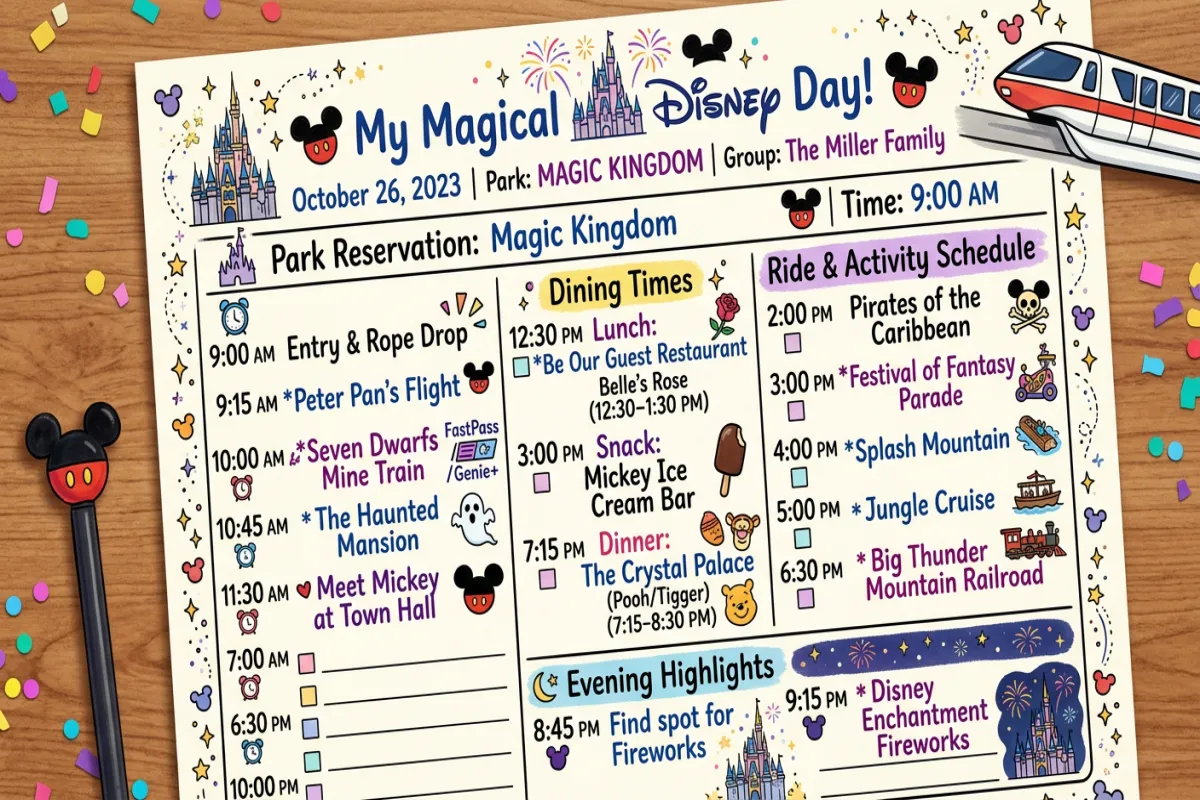
This is the core of the template. Each park day gets a detailed plan with:
Morning strategy. What time you’re arriving, whether you’re doing rope drop (getting there before the park opens to ride popular attractions first), and your first three rides in priority order. The template includes a note field for checking current wait times via the Disney app and adjusting on the fly.
Lightning Lane plan. Which rides you’re targeting for Lightning Lane (the paid skip-the-line service), what time your reservation windows open, and backup choices if your first pick isn’t available. This section is critical — knowing your Lightning Lane strategy before the day starts saves you from decision paralysis at 7am while the app is loading.
Meal schedule. Breakfast, lunch, snack, and dinner plans for each day. Disney dining involves table-service reservations (book 60 days out), quick-service spots (no reservation needed), and strategic snack stops. Each entry has the restaurant name, reservation time, confirmation number, and location within the park.
Show and entertainment schedule. Parade times, fireworks schedule, character meet-and-greet locations, and any shows or performances you want to catch. These are time-specific events that you need to plan around — missing the fireworks because you were waiting in line for Space Mountain is a fixable problem if you plan ahead.
Rest breaks. Built into the template as actual schedule items, not afterthoughts. Disney days are long and physically demanding, especially with kids. The template includes a mid-day break block (return to hotel, pool time, nap) that experienced Disney planners swear by.
Dining Reservations Master List
Every dining reservation across your entire trip in one table: date, meal, restaurant, park/resort location, time, confirmation number, and notes (allergies communicated, special requests, prepaid status). Disney dining reservations are notoriously hard to get — this list ensures you don’t accidentally double-book or miss a cancellation deadline.
Budget Tracker
Disney trips get expensive fast. This section tracks: tickets and park hoppers, resort/hotel, dining (table service, quick service, snacks), Lightning Lane and Genie+, merchandise, parking, tips, and extras (Memory Maker, special events). Pre-populated with typical Disney cost categories so you don’t forget anything.
Packing List — Disney Edition
A packing list tailored to theme park trips: comfortable walking shoes (you’ll walk 10+ miles per day), rain poncho (Florida afternoon showers are guaranteed), portable phone charger (the Disney app drains your battery), autograph book and pen for character meets, refillable water bottle, sunscreen, and your MagicBand or park ticket.
Plan Your Trip Today!
Get a complete, personalized trip template in seconds.
Take full control to customize every detail.
Plan My TripHow to Use It
- Copy the template. Click the link, then File → Make a copy in Google Docs.
- Start with the Park Reservation Calendar. If you’re going to Disney World, your park reservations dictate everything else. Assign a park to each day based on Extra Magic Hours, crowd calendars, and which day works best for your must-do rides.
- Book dining 60 days out. Disney World table-service reservations open exactly 60 days before your check-in date. Popular restaurants (Be Our Guest, Space 220, Ohana) sell out within minutes. Set a phone alarm and have this template open with your preferred restaurants and times ready to book.
- Build touring plans for each park day. Use the Day-by-Day section to map out your ride priority, Lightning Lane targets, and show times. Work backwards from fireworks — if the show is at 9pm, your evening rides need to be done by 8:30 to grab a good viewing spot.
- Share with your travel party. Share the Google Doc with everyone in your group. If traveling with multiple families, this keeps everyone aligned without a group text that nobody reads.
Disney Planning Tips
Prioritize rides with the longest wait times for rope drop or Lightning Lane. Rides like Flight of Passage (Animal Kingdom), Rise of the Resistance (Hollywood Studios), and Tron (Magic Kingdom) regularly have 60-120 minute waits by mid-morning. Either be at the park entrance 30 minutes before opening or budget for Lightning Lane on these headliners. For a deeper dive, check out our family vacation planning
Don’t skip the mid-day break. Park hours at Disney World often run 8am to 10pm or later. That’s a 14-hour day on your feet in Florida heat. Returning to your resort from noon to 3pm for pool time, a nap, or just air conditioning makes the evening session enjoyable instead of miserable. The template builds this break into each day.
Download everything for offline access. Export your itinerary as a PDF before your trip. Cell service inside Disney parks can be unreliable, especially during peak hours when thousands of people are using the same cell towers. A PDF on your phone works when the My Disney Experience app is spinning.
For a complete travel packet, use the Yopki Travel Document Organizer to merge your Disney itinerary with flight confirmations, resort booking details, and any printed tickets into one document.
Other Templates
Planning a trip that includes Disney as part of a larger vacation? These templates cover the broader trip logistics:
- Travel Planner Template — full trip planning from research to packing
- Vacation Itinerary Template — simplified layout for the non-Disney days of your trip
- Google Sheets Itinerary — spreadsheet version with budget auto-calculations
FAQ
Does this work for Disneyland too?
Yes. The template works for both Walt Disney World (Florida) and Disneyland Resort (California). Disneyland is simpler — two parks instead of four, no mandatory park reservations for most ticket types, and shorter distances between everything. You can simplify the template by removing sections that don’t apply.
How far in advance should I start planning?
For Disney World: start 6-7 months out for resort booking, 60 days out for dining reservations, and build your touring plan 2-3 weeks before your trip (when park hours and entertainment schedules are usually finalized). For Disneyland: 2-3 months of lead time is typically enough since it’s a less complex logistical operation. Or, skip the template and build your itinerary with AI
Is Lightning Lane worth it?
For headliner rides with 60+ minute wait times, individual Lightning Lane purchases can save you 1-2 hours of waiting per ride. Whether that’s “worth it” depends on your budget and tolerance for lines. The template has a field to pre-plan which rides justify the extra cost so you can decide before you’re standing in a 90-minute queue.