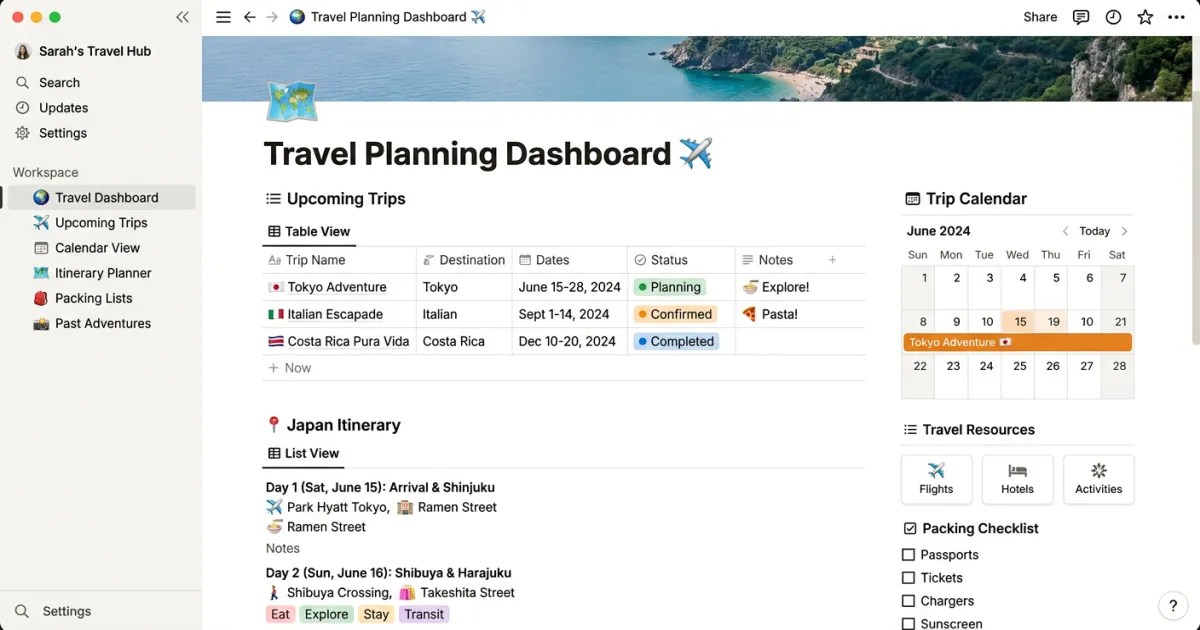
Notion has become one of the most popular tools for trip planning, and for good reason. Its flexible database system, customizable layouts, and free personal tier make it an ideal platform for organizing every detail of your travels. Whether you are planning a weekend getaway or a month-long international adventure, a well-built Notion travel itinerary template can keep everything in one place.
Below, you will find our free Notion travel itinerary template along with a complete guide on how to use it, what makes Notion great for travel planning, and how it compares to other popular planning tools.
Why Use Notion for Travel Planning
Travel planning involves juggling dozens of moving parts: flights, hotels, restaurant reservations, activities, budgets, packing lists, and important documents. Notion handles all of this through a single workspace, which is why it has become the go-to tool for organized travelers.
Here are the key reasons Notion works so well for trip planning:
- Databases for everything: Notion lets you create relational databases for flights, accommodations, activities, and expenses. Each entry can hold rich details like confirmation numbers, addresses, costs, and notes. You can filter, sort, and group entries however you like.
- Linked views: One database can appear in multiple views. Your accommodation database might show as a table on one page and a calendar on your itinerary page. Changes sync automatically across all views.
- Embedded maps: You can embed Google Maps links and even full map views directly into your Notion pages. Pin your hotel, restaurants, and attractions so everything is visual and easy to reference.
- Real-time collaboration: Share your workspace with travel companions and plan together. Everyone can add suggestions, update details, and leave comments. No more back-and-forth emails or group chat confusion.
- Offline access: The Notion mobile app lets you cache pages for offline viewing. Download your itinerary before you leave for the airport and access it without Wi-Fi.
- Generous free tier: Notion’s free plan gives you unlimited pages and blocks for personal use. You do not need to pay anything to build a comprehensive travel planner.
What Our Notion Travel Itinerary Template Includes
Our template is designed to be a complete travel planning system. Here is everything included:
Trip Dashboard
The main page serves as your trip command center. It displays a summary of your trip dates, destination, travel companions, and quick links to every section of the planner. Think of it as your home base where you can see the big picture at a glance.
Day-by-Day Itinerary Database
This is the core of the template. Each day of your trip gets its own entry with fields for morning, afternoon, and evening activities. You can add time slots, locations, reservation details, and notes. The database supports calendar view so you can see your entire trip timeline visually.
Accommodation Tracker
Keep all your hotel, Airbnb, or hostel details in one place. Track check-in and check-out dates, confirmation numbers, addresses, contact information, costs, and any special notes like parking instructions or Wi-Fi passwords.
Flight and Transport Database
Log every flight, train, bus, and rental car booking. Fields include departure and arrival times, terminal information, booking references, seat assignments, and costs. Sort by date to see your complete transportation timeline.
Budget Tracker
Set a total trip budget and track spending by category: accommodation, transport, food, activities, shopping, and miscellaneous. The template uses Notion formulas to calculate totals and show how much of your budget remains. You can also track expenses in multiple currencies.
Packing List with Checkboxes
A categorized packing list with checkbox properties so you can tick items off as you pack. Categories include clothing, toiletries, electronics, documents, and trip-specific items. Duplicate it for each trip and customize as needed.
Restaurant Wishlist
Save restaurants and cafes you want to try, organized by meal type and neighborhood. Include links to reviews, cuisine type, price range, and whether you need a reservation. Mark them as “visited” during your trip and add your own ratings.
Links and Bookmarks
A dedicated section for saving useful links: blog posts, travel guides, YouTube videos, local transportation apps, and anything else you find during your research phase.
Travel Document Storage
Upload or link to important documents like passport copies, visa confirmations, travel insurance policies, and vaccination records. Having these accessible in your planner means you will never be scrambling to find them at a border crossing or hotel check-in.
How to Use the Template
Getting started with our Notion travel itinerary template takes just a few minutes:
- Duplicate the template to your Notion workspace: Click the template link and select “Duplicate” in the top right corner. This creates a complete copy in your own Notion account that you can freely edit.
- Customize for your trip: Update the trip dashboard with your destination, dates, and travel companions. Delete any sections you do not need and add custom ones if your trip requires something specific.
- Fill in your details: Start populating the databases. Add your flights, hotels, and activities. Build out your day-by-day itinerary. Set your budget categories and amounts.
- Share with travel companions: Click “Share” in the top right and invite your travel partners by email. They can view or edit depending on the permissions you set. Everyone stays on the same page, literally.
For a deeper dive into structuring your trip from scratch, check out our complete guide on how to plan a trip.
Notion vs Other Travel Planning Tools
Notion is not the only option for trip planning. Here is how it stacks up against other popular tools:
Notion
- Pros: Extremely flexible and customizable. Free for personal use. Supports databases, linked views, embeds, and collaboration. Works on desktop, mobile, and web.
- Cons: Has a learning curve if you have never used it before. No native map integration (requires embedding). Offline access is limited to cached pages on mobile.
Google Sheets
- Pros: Simpler interface that most people already know. Better offline support through Google Drive. Easy to share and collaborate. Great for budget tracking with built-in formulas.
- Cons: Less visual than Notion. No database relationships. Can get messy with complex trips. Limited formatting options.
If you prefer spreadsheets, we also offer a Google Sheets travel itinerary template that is ready to use.
Yopki
- Pros: AI-powered trip planning that generates itineraries automatically. Visual and interactive interface. No setup or customization required. Built specifically for travel planning.
- Cons: Less customizable than a DIY Notion setup. Best for travelers who want a quick, ready-made plan rather than building from scratch.
Try our AI travel planner if you want a fast, intelligent itinerary without the manual setup.
Best Notion Features for Travel Planning
If you are going to use Notion for your trip, make sure you take advantage of these powerful features:
Linked Databases
Create one master database for activities and display filtered versions on each day’s page. When you update the original entry, changes appear everywhere. This keeps your planner consistent and saves you from duplicating information.
Gallery View for Inspiration
Switch any database to gallery view and add cover images. Use this for your restaurant wishlist or attractions list to create a visual mood board for your trip. Seeing photos of destinations makes planning more exciting and helps you prioritize what to visit.
Timeline View for Your Itinerary
Timeline view displays your activities along a horizontal time axis. This is perfect for seeing how your days are structured and spotting gaps or overlaps in your schedule. Drag and drop to rearrange activities.
Embedded Google Maps
Paste a Google Maps link into Notion and it creates an embed block. You can view maps of your hotel location, walking routes, or a custom map with all your pins directly inside your planner.
Toggle Blocks for Detailed Notes
Use toggle blocks to hide detailed information under clean headings. Store lengthy directions, tips from other travelers, or backup plans inside toggles to keep your pages uncluttered while still having all the information available when you need it.
Synced Blocks for Shared Info
Synced blocks let you create a piece of content that appears identically across multiple pages. Perfect for emergency contacts, hotel addresses, or other information you need to reference from several places in your planner.
Tips for Notion Trip Planning
Here are practical tips to get the most out of your Notion travel planner:
- Use templates as a starting point, not a final product: Every trip is different. Customize your template based on the type of trip, destination, and your personal planning style. Remove what you do not need and add what you do.
- Keep it simple: It is tempting to build an elaborate system with dozens of databases and views. Resist that urge, especially for your first Notion trip. A simple planner you actually use beats a complex one you abandon.
- Use the mobile app for on-the-go access: Download the Notion app and cache your trip pages before you leave. During your trip, use it to check your itinerary, mark off packing items, and log expenses.
- Export to PDF for offline backup: Notion’s offline mode is not always reliable, especially in areas with poor connectivity. Export your itinerary pages to PDF and save them to your phone as a backup.
- Plan in phases: Do not try to fill in everything at once. Start with the big items (flights, hotels), then add activities, then restaurants, then the small details. This keeps the process manageable and enjoyable.
Other Template Formats
Notion is not for everyone, and that is perfectly fine. We offer travel itinerary templates in several other formats:
- Travel Itinerary Template for Google Sheets – Best for spreadsheet lovers and budget tracking
- Travel Itinerary Template for Google Docs – Best for simple, document-style planning
- Free Itinerary Template – Our most popular all-purpose template
Browse all of our travel planning templates to find the format that works best for you.
Planning Tools That Work With Notion
Notion works even better when you pair it with other travel tools:
- Google Maps: Create a custom map with all your pins and embed it in Notion. Save places directly from Google Maps and reference them in your itinerary database.
- Google Flights: Research flights and paste booking details into your transport database. Notion does not have flight search built in, so use external tools for the research phase.
- Trail Wallet or Splitwise: If you need more robust expense tracking or bill splitting with travel partners, use a dedicated app alongside Notion’s budget tracker.
- Yopki AI Travel Planner: Use our AI travel planner to generate a starter itinerary, then copy the details into your Notion template for further customization.
Frequently Asked Questions
Is Notion free for travel planning?
Yes. Notion’s free plan includes unlimited pages and blocks for individual use. You can build a complete travel planner without paying anything. The paid plans add features like unlimited file uploads and advanced permissions, but the free tier is more than enough for most travelers.
Can I use Notion offline during my trip?
The Notion mobile and desktop apps support offline access for pages you have previously visited. Make sure to open your key itinerary pages while you are still connected to the internet so they are cached. For maximum reliability, also export your itinerary to PDF as a backup.
Can I share my Notion travel plan with others?
Absolutely. You can invite travel companions to your Notion workspace by email. Set permissions to “Can edit” for collaborative planning or “Can view” for read-only access. You can also share a public link for people who do not have Notion accounts.
How do I duplicate a Notion template?
When you open a Notion template link, click the “Duplicate” button in the top right corner. This copies the entire template into your personal Notion workspace. From there, you can customize it however you like.
What if I prefer a simpler planning tool?
If Notion feels too complex, try our Google Sheets template for a simpler spreadsheet approach, or use the Yopki AI travel planner to generate a complete itinerary automatically with no setup required.