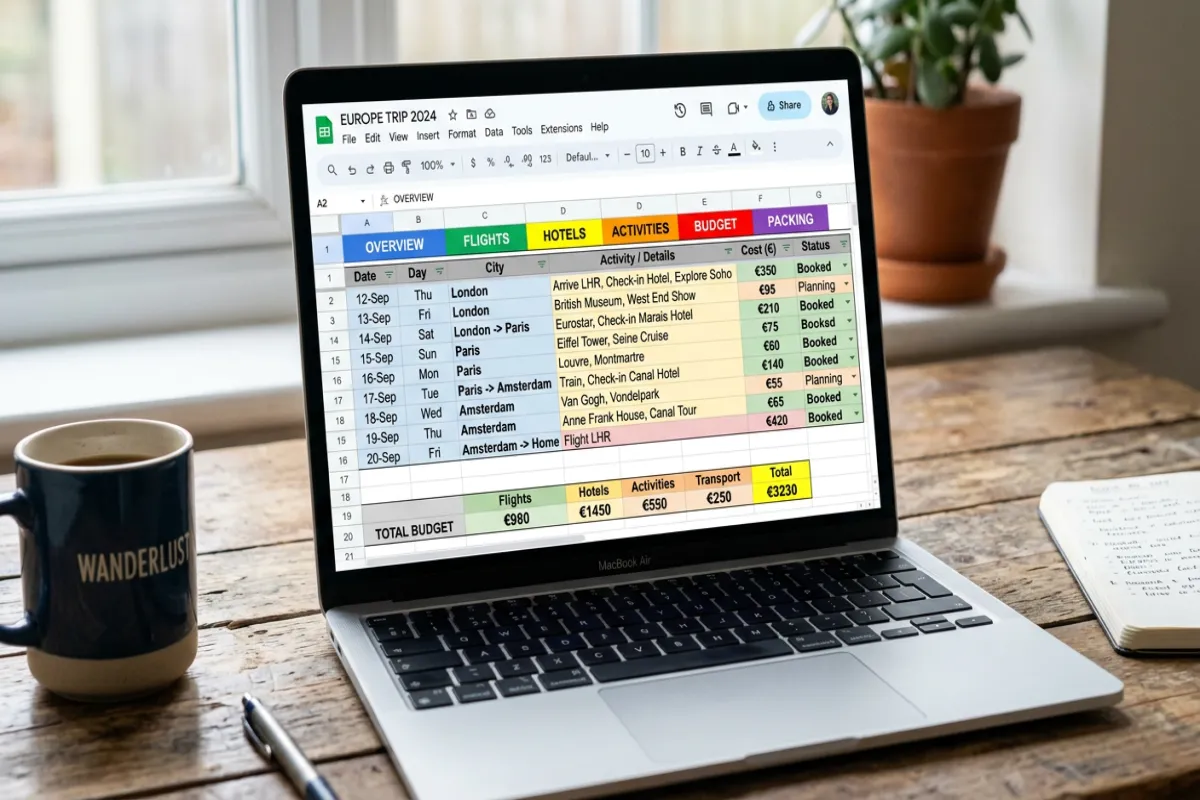
Vacation Planning Spreadsheet: How to Organize Your Family Trip

Organize your next vacation effortlessly with our trip planning spreadsheets. Perfect for families and groups, create itineraries that keep everyone on track!
Family planning a vacation using a spreadsheet, showcasing collaboration and excitement

Planning a family vacation often starts with a simple spreadsheet, but as trips grow in complexity, that spreadsheet can become the source of stress rather than clarity. This article explains what a vacation planner spreadsheet is, why common spreadsheet approaches break down for families and multi-generational groups, and how to build practical spreadsheets that reduce friction while keeping everyone aligned. You will learn essential fields to include—itinerary, budget, packing, contacts—plus templates that work for kids and elders, budgeting strategies for shared costs, and collaboration practices that minimize version confusion. The guide also covers when it makes sense to move beyond spreadsheets toward purpose-built family travel planning tools, and it offers a step-by-step migration checklist to preserve your data and simplify onboarding. Throughout, we use terms like trip planning spreadsheet, family vacation organizer app, and travel budget tracker for multiple people to make it easy to compare options and decide the best path for your group.

What Are the Essential Features of a Trip Planning Spreadsheet?

A trip planning spreadsheet is a structured document that organizes itinerary items, budget lines, packing lists, and traveler contacts to coordinate a family vacation efficiently. It works by consolidating dates, locations, costs, and responsibilities into linked sheets so planners can sort, filter, and reconcile information across categories. The primary benefit is a centralized reference that reduces forgotten bookings and duplicate purchases, which directly lowers planning stress and errors. Below are the must-have components that let a single spreadsheet function as a reliable family trip organizer, followed by a comparison showing how spreadsheets stack up against purpose-built apps.

Essential components to include in any trip planning spreadsheet:

  • Itinerary essentials like dates, times, location, and responsible person for each item.
  • Budget lines with payer, category, per-person split, and receipt/reference.
  • Packing lists broken out by traveler role and shared items.

These components set up the structure that supports customization and collaboration for family trips. The next subsections show practical itinerary templates and a budget approach you can adopt immediately.

Which Travel Itinerary Templates Work Best for Family Trips?

Different travel itinerary templates for family trips displayed on devices, highlighting organization

Different itinerary templates fit different family needs; choosing the right structure reduces decision friction and keeps expectations clear. Day-by-day templates list time slots and activities for each day, which is ideal for families who need clear transitions and nap or downtime planning. Slot-based or time-block templates use broader windows and are better when flexibility is required for spontaneous or weather-dependent activities. Activity-focused templates center on specific attractions and booking references, useful when coordinating reservations or tickets across multiple family members. Use a day-by-day layout for younger children, a slot-based plan for mixed-age groups that need flexibility, and an activity-focused sheet when bookings must be tracked closely. Choosing the right template improves clarity and makes it easier to map the itinerary to maps and travel times in later planning steps.

How to Use a Trip Budget Spreadsheet to Manage Vacation Costs?

A trip budget spreadsheet organizes estimated and actual costs, assigns payers, and tracks settled versus outstanding balances to reduce confusion about who owes what. Start by creating categories (transport, lodging, meals, activities, supplies) and then add columns for estimated cost, actual cost, payer, split method, and settled status. Use conceptual formulas to calculate per-person shares, rolling totals, and variance between estimated and actual spending, and keep a reconciliation column for receipts or photo references. Regularly reconcile entries after major expenses and use a summary section that shows net owed amounts by traveler to simplify settlement. Clear expense conventions and periodic reconciliations minimize disputes and let the group focus on the trip itself rather than bookkeeping.

ComponentSpreadsheet (Google Sheets / Excel)Purpose-built app (Yopki)
Itinerary fieldsCustomizable but manual setup and linking requiredPre-built itinerary modules tailored to family trips
Budget and splitsFlexible formulas; manual reconciliation often neededAutomated expense splitting and status tracking
CollaborationCloud editing available but version confusion can occurReal-time collaboration with role controls and notifications

This table highlights where spreadsheets provide flexibility and where purpose-built apps reduce manual overhead. Next, we’ll examine why those spreadsheet limitations matter for families.

Why Do Generic Spreadsheets Fall Short for Family and Group Travel Planning?

Generic spreadsheets are powerful general tools, but they were not designed specifically for the dynamics of family travel, and that mismatch creates predictable pain points. Spreadsheets rely on manual updates and fragile formulas, which increases human error and causes stale or conflicting data in group contexts. Collaboration controls are limited, mobile formatting is often poor, and travel-specific integrations like maps or activity suggestions are absent, which forces manual lookups and duplicate work. These limitations increase planning time and stress, and they amplify version-control problems when multiple family members try to edit the same files. Recognizing these constraints helps clarify when a spreadsheet is still a good fit and when a purpose-built solution becomes the logical next step.

What follows is a concise account of typical spreadsheet limitations and how collaboration issues escalate complexity.

What Are the Common Limitations of Spreadsheets for Family Trip Organizing?

Common spreadsheet limitations include broken formulas, crowded templates, and difficulty scaling to many travelers or last-minute changes. Human error from manual entry produces reconciliation headaches, and complex templates become brittle as rows and columns shift. Spreadsheets lack native travel-specific features like booking link parsing, offline itinerary access for mobile, and contextual reminders tied to itinerary items. These failings increase the time required to maintain the plan and raise the chance of missed reservations or duplicated purchases. Understanding these limitations makes it easier to adopt mitigations or decide to switch tools when complexity grows.

How Do Collaboration and Version Control Issues Affect Group Travel Planning?

Collaboration problems in spreadsheets show up as conflicting edits, overwritten entries, and unclear ownership, which can lead to double-booked pickups or mismatched meeting times. Multiple editors may unknowingly create race conditions, and audit trails are often insufficient to trace who changed critical cells and why. Attempts to manage this with naming conventions, locked cells, or edit windows create process overhead and still leave room for mistakes. Clear role assignments and a single shared source of truth mitigate issues temporarily, but for larger groups, the lack of role-based permissions and structured comments becomes a real barrier to reliable planning.

After outlining the collaboration pitfalls, the next section shows how to adapt spreadsheets for multi-generational groups and where targeted customization helps.

How Can You Customize a Group Travel Planner Spreadsheet for Multi-Generational Vacations?

Customizing a group travel planner spreadsheet for multi-generational vacations means adding role-aware fields, accessibility notes, and filterable views so each family member sees relevant information quickly. Use traveler-type tags (child, adult, elder) and create view filters or separate tabs for role-specific needs like nap windows, mobility constraints, and medication schedules. Add suitability indicators for activities and emergency contact blocks with clear document checklists to ensure essential items are accessible. Also, include a shared expense ledger with a per-person breakdown and settled status column to keep financials transparent across ages. These adaptations help a spreadsheet behave more like a tailored planner without immediately abandoning familiar tools.

Intro to a practical field mapping table that shows suggested fields by traveler type:

Traveler TypeNeeds / ConstraintsSuggested Spreadsheet Fields
Young childrenNap schedule, stroller needs, child ticketsNap times, child gear, ticket counts
AdultsActivity preferences, payment responsibilityPreferred activities, payer column, contact
Older adultsMobility/accessibility, medicationAccessibility notes, medication list, nearest clinic

This EAV-style mapping clarifies how to structure columns and tabs for each group member. The next section covers packing and expense tracking specifics that often cause the most friction.

What Packing List and Itinerary Elements Should Be Included for Families?

Packing lists for families should be category-based and role-aware so shared items and individual gear are clearly assigned and tracked. Break lists into categories (kids, adults, shared, medical) and include fields for quantity, storage location, and last-minute pack status. Add a documents checklist for passports, insurance, and booking confirmations and link these to the itinerary day when they’re needed. Prioritize redundancy for critical items (medications, chargers) and include contingency plans (backup clothing, nearby pharmacy). This structure reduces last-minute panic and ensures everyone knows who is responsible for shared gear.

How to Track Shared Expenses and Budgets Across Multiple Travelers?

Family member tracking shared expenses in a budget spreadsheet, emphasizing collaboration and organization

Tracking shared expenses requires consistent entry conventions: record payer, amount, category, split method, and settled status for each expense line. Use a ledger tab that aggregates totals per person, shows outstanding balances, and includes a reconciliation column for receipts and proof. Periodic reconciliation checkpoints—after major shared purchases—keep the group aligned and avoid end-of-trip disputes. For larger groups, add an “assigned payer” column for each activity to avoid ambiguity and run a final settle-up summary before departure home. Clear conventions and regular reconciliation reduce the bookkeeping burden and keep the focus on enjoying the trip.

What Are the Best Practices for Creating and Sharing a Family Trip Organizer Spreadsheet?

Best practices reduce errors and improve collaboration when you choose to use spreadsheets as your primary planner interface. Start with a clean template and consistent naming conventions, lock formula cells to prevent accidental edits, and assign ownership for major sections like itinerary, budget, and packing. Use a single shared drive for the master file, restrict edit rights where possible, and maintain a brief change log or update cell that notes the last editor and date. These practices create a pseudo-governance model that keeps the spreadsheet reliable and minimizes the chance of conflicting versions. Below are recommended actionable practices you can copy into your team norms.

  • Use a single master file: Keep one authoritative spreadsheet in a shared drive to avoid duplicates.
  • Assign section owners: Designate one person per section to manage updates and reconciliations.
  • Lock formulas and templates: Protect critical cells and provide editable input areas only.
  • Date-stamp major changes: Add a change log entry for transparency on edits.

These policies reduce confusion and set clear expectations for family contributors. Implementing them leads naturally to better real-time collaboration approaches discussed next.

How to Ensure Real-Time Collaboration and Avoid Manual Updates?

To approximate real-time collaboration, host your spreadsheet on cloud platforms like Google Sheets or Excel online and enable comment features and notifications for edits. Establish simple policies such as short edit windows, daily sync checks, and a change log cell where editors note significant updates. Despite these steps, spreadsheets still lack role-based access and contextual reminders tied to itinerary items, which creates limitations for larger groups. Use these real-time practices as a bridge while evaluating whether a purpose-built planner is a better long-term solution for your family’s needs.

Which Tools Enhance Mobile Accessibility for On-the-Go Trip Planning?

Mobile accessibility depends on simplified views and focused data entry forms so family members can quickly reference itinerary details or add expenses from their phones. Use mobile-optimized templates with one column per screen, large readable text, and minimal required fields for quick edits. Consider complementary apps for receipt capture and offline access to booking confirmations, but be aware that syncing multiple tools increases integration overhead. Mobile-first planning and offline sync are areas where purpose-built family travel planners offer distinct advantages over generic spreadsheet setups.

When Should You Consider Alternatives to Spreadsheets for Trip Planning?

You should consider alternatives to spreadsheets when group size, real-time coordination needs, or integrated features push manual work beyond manageable limits. Key criteria include group size larger than six people, frequent last-minute changes requiring push notifications, a need for integrated maps and activity suggestions, or desire for automated expense splitting and settlement. Purpose-built planners shine when you need role-based permissions, mobile-first UX with offline support, and integrations that reduce manual data entry. If these criteria match your planning pain points, evaluating dedicated family travel planning software becomes a pragmatic step rather than an indulgence.

  • Is your group larger than six travelers or multi-generational?
  • Do you need automated expense splits and settlement tracking?
  • Is mobile access and offline support critical for your group?
  • Would integrated maps and activity suggestions save time?

If you answer yes to multiple items above, alternatives can significantly reduce planning time and errors. The following subsection compares the concrete benefits you gain by moving to a purpose-built system.

What Are the Benefits of Purpose-Built Family Travel Planning Apps Over Spreadsheets?

Purpose-built family travel planning apps consolidate itinerary, bookings, maps, and expenses into modules specifically designed for group travel, which reduces manual linking and error-prone tasks. These apps typically provide automated expense splitting, push notifications for itinerary changes, role-based access controls, and mobile-optimized views that work offline. The outcome is less planning overhead, fewer version conflicts, and faster decision-making for families who need coordinated logistics. For problem-aware users frustrated by generic spreadsheets, a purpose-built app becomes the logical choice to streamline planning and reduce trip-day stress.

How Do Integrated Features Like Maps and Activity Suggestions Improve Planning?

Integrated maps and activity suggestions remove manual lookups and let planners sequence activities by proximity and travel time, reducing wasted transit and improving daily flow. A typical flow in an integrated planner is: search for an activity, view it on the map, add it to the itinerary, and automatically adjust timing based on travel duration and opening hours. This triple—activity suggestion → map integration → itinerary auto-adjustment—saves time and prevents overlapping reservations. Such integration is especially valuable for families juggling naps, mobility needs, or constrained booking windows.

Within decision-making contexts, it helps to see concrete product outcomes. When users are problem-aware and frustrated with spreadsheets, Yopki is presented as the purpose-built alternative that addresses core frustrations: collaboration failures, mobile limitations, and lack of travel-specific integrations. Yopki positions itself to convert users toward free signups by offering a focused family travel planner experience that reduces planning workload and improves coordination for multi-generational trips.

How to Transition from a Trip Planning Spreadsheet to a Dedicated Family Travel Planner?

Transitioning from a spreadsheet to a dedicated planner is best done incrementally: export critical data, standardize formats, and import in phases to preserve continuity and reduce onboarding friction. Begin by exporting itinerary rows, budget lines, and contacts into CSVs and clean date/time formats and column headers. Prioritize migrating must-have items first—contacts and itinerary—then move budgets and receipts, and finally refine packing lists and notes in the new planner. Communicate the phased plan to family members and invite them to the new system gradually so they can adopt new workflows without losing access to familiar references. The result is a controlled migration that reduces confusion and preserves data integrity.

Intro to migration mapping table that aligns spreadsheet data types with app constructs:

Data TypeExport / Transform StepAction in Yopki
Itinerary rowsExport CSV; standardize date/timeImport into itinerary module and assign attendees
Budget linesExport CSV; normalize payer and split fieldsMap to expense tracker with automated splits
Contacts & docsExport VCard / CSV; attach document referencesImport contacts and set roles or emergency flags

What Steps Simplify Moving Your Itinerary and Budget Data?

A concise checklist simplifies the export-import workflow and reduces errors during migration. First, export itineraries and budgets as CSV files and standardize date and time formats so the app can parse them reliably. Clean column headers to match target fields (for example: “Start Date”, “End Time”, “Payer”), then import contacts and assign roles before importing budgets so expenses can be linked to people. Finally, review imported entries and run a reconciliation to verify totals and settled statuses. These steps minimize import errors and make it easy to validate that the migration preserved essential planning context.

  1. Export CSVs: Save itinerary, budget, and contacts as CSV files with consistent date formats.
  2. Clean columns: Standardize headers and remove merged cells or comments that block import.
  3. Import contacts first: Bring in people and assign roles so expenses and itinerary items connect properly.
  4. Validate and reconcile: Compare totals and check unsettled balances after import.

Following this checklist reduces friction and lowers the risk of losing data during transition. The next subsection explains how specialized software can further streamline your planning.

How Can You Maximize Efficiency and Reduce Stress with Specialized Software?

Specialized software reduces repetitive tasks through templates, automation, and reminders that turn manual bookkeeping into automated processes. Use pre-built family templates for itineraries and budgets, enable automated expense splitting and payment reminders, and leverage activity suggestions and map integrations to avoid manual lookups. Designate one family admin to manage initial setup and templates so others can contribute with minimal training. These practices let the software handle routine work and free the family to focus on decisions that require personal judgment.

  • Use templates to standardize future trips and reduce setup time.
  • Automate expense splits and reminders to minimize reconciliation tasks.
  • Assign one admin to manage templates and invite family members gradually.

For readers ready to act, the logical next step for problem-aware users is to try a purpose-built family travel planner. Yopki is presented as the intuitive, efficient alternative to spreadsheets—designed to guide problem-aware users toward free signups and to simplify family and multi-generational travel planning. Try a free Yopki signup to migrate your core itinerary and budgets and experience reduced planning friction immediately.

Data TypeAttribute (Export/Transform Step)Value (Action in Yopki)
ItineraryExport CSV; standardize formatsImport to itinerary module; assign attendees
BudgetNormalize payer/splits; export CSVImport to expense tracker; enable automated splits
Packing & notesConsolidate lists into categoriesCreate shared packing lists and reminders within the app

If your planning has become complex or error-prone, moving to a family-focused planner and using the steps above will streamline coordination and reduce stress through automation and better collaboration.

Conclusion

Efficiently organizing a family trip with a well-structured vacation planner spreadsheet can significantly reduce stress and enhance collaboration among family members. By incorporating essential features like itineraries, budgets, and packing lists, families can ensure that everyone is aligned and informed throughout the planning process. Transitioning to a purpose-built family travel planner can further streamline this experience, offering automated features that minimize manual work and errors. Start exploring dedicated travel planning tools today to simplify your next family adventure.

Share the Post:

Related Posts

This Headline Grabs Visitors’ Attention

A short description introducing your business and the services to visitors.