What Is an Itinerary Generator (And Do You Actually Need One)?
An itinerary generator takes your trip details – destination, dates, interests – and builds a structured day-by-day travel plan. Some use AI to create the entire plan automatically. Others give you a blank framework to fill in yourself.
The real question isn’t whether you need one. It’s which type fits how you actually plan trips.
If you want a complete plan fast, an AI-powered generator like Yopki builds one in about 60 seconds. If you prefer designing a pretty PDF, Canva’s templates work well. If you want total control over every cell and formula, Google Sheets is still hard to beat.
We tested six popular options head-to-head. Here’s how they compare.
The 6 Best Itinerary Generators Compared
| Tool | Type | AI Generation | Map View | Collaboration | Free Plan | Best For |
|---|---|---|---|---|---|---|
| Yopki | AI Generator + Planner | Yes – full itinerary | Yes – interactive | Yes – real-time sharing | Yes | All-in-one trip planning |
| Canva | Design Template | No | No | Limited | Yes (basic templates) | Printable, visual itineraries |
| Google Sheets | Manual Spreadsheet | No | No | Yes – Google sharing | Yes | Budget tracking + full control |
| ChatGPT | AI Text Generator | Yes – text only | No | No | Yes | Brainstorming and research |
| Wanderlog | Trip Planner | Partial | Yes | Yes | Yes (limited) | Booking integration |
| TripIt | Itinerary Organizer | No – imports bookings | Basic | Yes – share link | Yes (basic) | Organizing existing bookings |
1. Yopki – Best All-in-One Itinerary Generator
Yopki is the only tool on this list that handles every stage of trip planning in one place. The AI generates a complete itinerary, you customize it on a drag-and-drop calendar, everything shows up on an interactive map, and you can share the whole plan with your travel group.

What it does well:
- Generates a full day-by-day itinerary from a single prompt
- Visual calendar where you drag activities between days and time slots
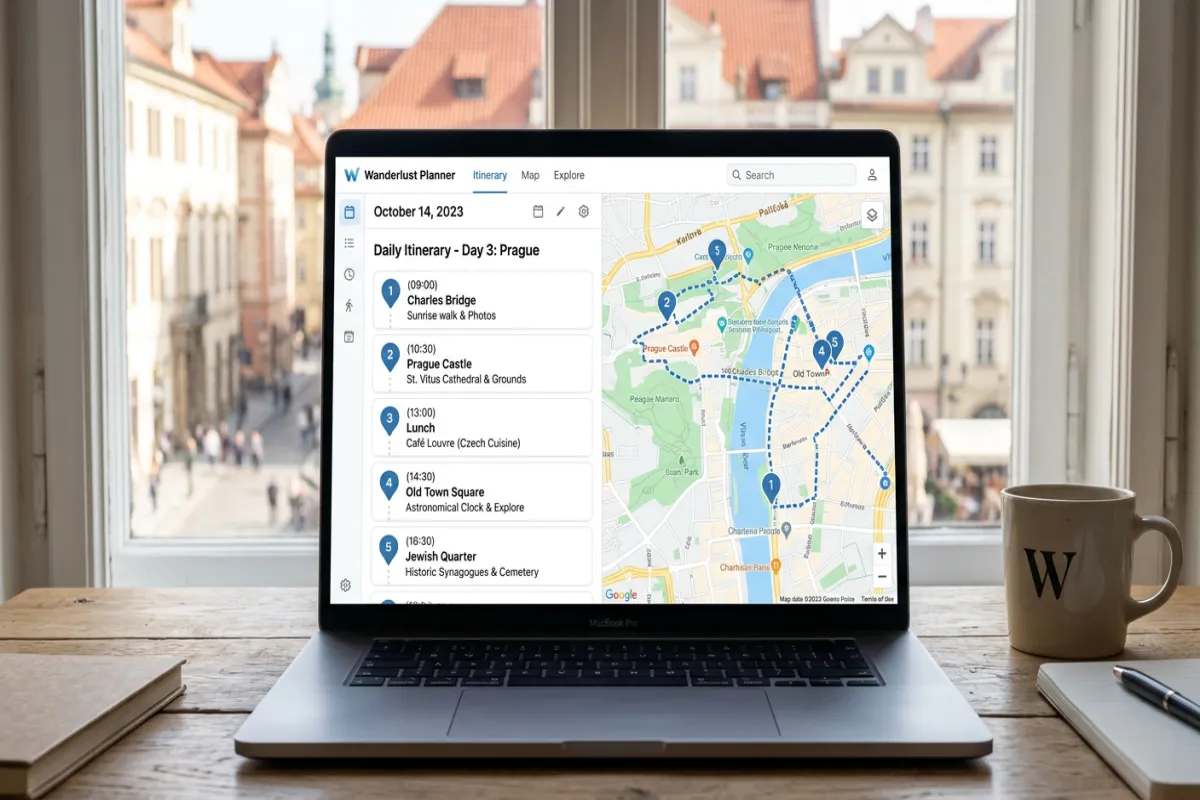
- Map view showing every stop, so you can spot inefficient routing
- Real-time sharing with travel companions who can suggest edits
- Works on web, iOS, and Android
Where it falls short: Less useful if you only need a printable PDF design. Canva is better for that specific use case.
Price: Free for core features including AI generation. Premium plans available for power users.
2. Canva – Best for Printable Itinerary Designs
Canva doesn’t generate content for you. Instead, it gives you professionally designed templates that you fill in with your own trip details. The result is a polished, printable itinerary that looks great on paper or as a shared PDF.
What it does well:
- Hundreds of itinerary templates with professional layouts
- Easy drag-and-drop editor for non-designers
- Export as PDF, PNG, or shareable link
- Great for group trips where you want to hand out printed copies
Where it falls short: You do all the research and planning yourself. No map view, no AI suggestions, no route optimization. It’s a design tool, not a planning tool.
Price: Free templates available. Canva Pro ($13/month) unlocks premium templates and features.
3. Google Sheets – Best for Budget-Focused Manual Planning
The spreadsheet approach works well if you want complete control over every detail, especially budget tracking. You can build formulas for daily spending, link to booking confirmations, and share the sheet with your travel group.
What it does well:
- Total control over structure, categories, and formulas
- Built-in budget tracking with automatic calculations
- Easy sharing and real-time collaboration through Google
- Free itinerary templates available to skip starting from scratch
Where it falls short: Time-consuming to set up. No map view, no AI assistance, and the result isn’t particularly visually appealing. You also need to do all your own research.
Price: Free.
4. ChatGPT – Best for Trip Research and Brainstorming
ChatGPT generates surprisingly detailed text-based itineraries. Ask it to plan five days in Tokyo and you’ll get a solid starting framework with activities, restaurants, and timing estimates.
What it does well:
- Generates detailed text itineraries from conversational prompts
- Good at suggesting activities based on specific interests
- Can factor in budget constraints, dietary restrictions, and travel style
- Useful for comparing multiple destination options quickly
Where it falls short: The output is plain text. No calendar, no map, no drag-and-drop rearranging. You’ll need to copy the suggestions into a real planning tool. It also occasionally recommends restaurants or attractions that have closed, since its training data has a cutoff.
Price: Free tier available. ChatGPT Plus ($20/month) for GPT-4 access.
5. Wanderlog – Best for Booking Integration
Wanderlog sits somewhere between a trip planner and a travel journal. It combines itinerary planning with the ability to search and book hotels and flights directly in the app.
What it does well:
- Booking search built into the planning interface
- Map view with route planning between stops
- Collaborative planning with shared lists
- Auto-import bookings from email
Where it falls short: The AI features are more limited than Yopki’s. The free plan restricts some features, and the interface can feel cluttered once you add multiple days of activities.
Price: Free basic plan. Pro plan ($8/month) removes ads and unlocks all features.
6. TripIt – Best for Organizing Existing Bookings
TripIt doesn’t help you plan a trip. It helps you organize one you’ve already booked. Forward your confirmation emails, and TripIt assembles them into a unified timeline with flight times, hotel addresses, and reservation details.
What it does well:
- Automatically parses booking confirmation emails
- Creates a clean timeline of all reservations
- Real-time flight alerts and gate change notifications (Pro plan)
- Shareable itinerary link for travel companions
Where it falls short: No activity planning, no AI suggestions, no map-based route optimization. It’s strictly an organizer for things you’ve already booked elsewhere.
Price: Free basic plan. TripIt Pro ($49/year) adds flight alerts, seat tracking, and fare refund monitoring.
How to Generate an Itinerary in 60 Seconds with Yopki
If you want a working itinerary fast, here’s the step-by-step process using Yopki’s AI travel planner:
- Go to yopki.com/ai-travel-planner – No account required to start.
- Enter your destination – Type the city or country you’re visiting.
- Set your dates – Pick your arrival and departure dates from the calendar.
- Choose your interests – Select from categories like food, history, outdoor activities, nightlife, or family-friendly spots.
- Click Generate – The AI builds a day-by-day plan with activities, restaurants, and logistics in about 60 seconds.
- Customize – Drag activities between days and time slots. Add your own stops. Remove anything that doesn’t fit.
- Share – Send the plan to your travel companions so everyone can see (and suggest changes to) the same itinerary.
The entire process takes about a minute to get a first draft. Customizing and sharing adds another 5-10 minutes depending on how specific you want to get.
Itinerary Templates vs. Itinerary Generators: Which Should You Use?
These terms get used interchangeably, but they solve different problems.
Itinerary templates (Canva, Google Sheets, Word) give you a blank, pre-formatted structure. You fill in every detail yourself: what to see, where to eat, how to get around, how long each activity takes. The upside is full control over the look and content. The downside is the time investment. Planning a seven-day international trip from scratch in a spreadsheet can take hours.
Itinerary generators (Yopki, ChatGPT) create content for you based on your inputs. The AI pulls from travel data to suggest activities, estimate timing, and organize everything into a logical daily flow. You review and edit rather than building from zero.
When to use a template:
- You’ve already done all your research and just need to organize it
- You want a specific visual design (for printing or sharing as a PDF)
- You’re planning a highly customized trip where generic AI suggestions won’t help
When to use a generator:
- You want a working plan quickly and will customize from there
- You’re exploring a destination you haven’t researched yet
- You’d rather edit an existing plan than build one from scratch
Many travelers use both. Generate a plan with Yopki, then export the details into a Canva template if you want a pretty printed version.
Free vs. Paid Itinerary Tools: What Do You Actually Get?
Every tool on this list has a free tier. Here’s what the free version actually includes, and when you might need to upgrade.
Genuinely free with no real limitations:
- Google Sheets (everything is free)
- ChatGPT free tier (basic itinerary generation)
- Yopki (AI generation, calendar planner, map, sharing)
Free but with notable restrictions:
- Canva (limited template selection, watermarks on premium elements)
- Wanderlog (ads, some features locked)
- TripIt (no flight alerts, no seat tracking on free tier)
For most travelers planning one to three trips a year, free tools are more than enough. Paid plans make sense for frequent travelers or people who want specific premium features like offline access, advanced collaboration, or real-time flight tracking.
Tips for Getting the Best Results from Any Itinerary Generator
No matter which tool you choose, these tips will improve your output:
- Be specific with your inputs. “Five days in Rome with a focus on ancient history and local food markets” produces a much better AI itinerary than “Rome trip.”
- Don’t overschedule. Three to four activities per day is realistic. Five or more leads to burnout and missed reservations. For more on pacing, see our complete trip planning guide.
- Check the map. If your tool has a map view, use it. You’ll immediately spot days where you’re zigzagging across the city instead of hitting nearby stops in sequence. Using Google Maps for itinerary planning is another solid option for route checking.
- Build in buffer time. Add 30-60 minutes of unscheduled time between major activities. Transit takes longer than you think, and some spots deserve more time than planned.
- Front-load must-see items. Put your non-negotiable activities earlier in the trip. If anything goes sideways (weather, fatigue, a spontaneous detour), the essentials are already done.
- Save a copy. Whatever tool you use, export or screenshot your final itinerary. Having an offline backup is essential when you’re in a foreign country with spotty cell service.
Frequently Asked Questions
Is there a free AI to make a travel itinerary?
Yes. Yopki lets you generate a full day-by-day itinerary for free using AI. Enter your destination, dates, and interests, and the AI builds a structured plan with activities, restaurants, and logistics, all displayed on a visual calendar and interactive map. ChatGPT can also generate text-based itineraries for free, but you’ll need to organize the output into a usable format yourself.
What is the best program to make an itinerary?
It depends on what you need. Yopki is the best all-in-one option: AI generates the itinerary, a drag-and-drop calendar lets you rearrange it, a map shows where everything is, and you can share it with travel companions. Canva is better if you want a printable, designed PDF. Google Sheets works if you prefer full manual control. Wanderlog is a strong alternative with booking integration.
How do I create a free itinerary?
The fastest way is to use an AI itinerary generator like Yopki. Go to yopki.com/ai-travel-planner, enter your destination and dates, and the AI will generate a complete itinerary in about 60 seconds. You can then customize it by dragging activities, adding your own stops, and sharing with your group. For a manual approach, use a free itinerary template in Google Sheets or Canva.
Is Yopki’s itinerary generator really free?
Yes. Yopki’s core features are free: AI itinerary generation, the visual calendar planner, interactive map, and trip sharing. You can generate, customize, and share complete itineraries without paying. Premium features like offline access and advanced collaboration are available on paid plans, but the itinerary generator itself is free to use.
Can ChatGPT generate a travel itinerary?
ChatGPT can generate a text-based travel itinerary when you describe your trip. It does a good job suggesting attractions, estimating timeframes, and structuring a day-by-day plan. However, the output is plain text with no calendar view, no map, and no way to rearrange activities by dragging them. For a usable, shareable itinerary, you’d need to copy ChatGPT’s suggestions into a dedicated travel planner like Yopki.
What is the difference between an itinerary generator and an itinerary template?
An itinerary generator uses AI to create a personalized plan based on your destination, dates, and interests. The content is generated for you. An itinerary template is a blank, pre-formatted document (in Google Sheets, Canva, or Word) that you fill in yourself. Generators are faster. Templates give you more control over formatting and design.
The Bottom Line
The best itinerary generator depends on how you plan trips. If you want a complete plan generated quickly and displayed on a calendar with a map, Yopki is the most capable free option. If you want a beautiful printed itinerary, Canva delivers. If you want spreadsheet-level control with budget formulas, Google Sheets still works. And if you just want to brainstorm destinations and activities, ChatGPT is a solid research starting point.
For most travelers, the best workflow is: generate a draft with AI, then refine it with a visual tool. That’s exactly what Yopki’s itinerary generator is built to do.
Ready to build your next trip? Try the free AI itinerary generator and have a plan in 60 seconds. Or explore our guide to AI travel planners if you want to learn more about how the technology works.