
I spent three weeks testing every major AI travel planner on the market. I planned the same trip on each one: a 7-day family vacation to Japan with two kids under 10. The differences were eye-opening.
Some tools gave me a wall of text. Others built a visual, day-by-day plan I could actually use. Here is what I found, which tools are worth your time, and which ones fall short.
What Is an AI Travel Planner?
An AI travel planner is a tool that uses artificial intelligence to generate a personalized trip itinerary based on your destination, dates, interests, and budget. Instead of spending hours on Google and TripAdvisor, you answer a few questions and get a structured, day-by-day plan in seconds.
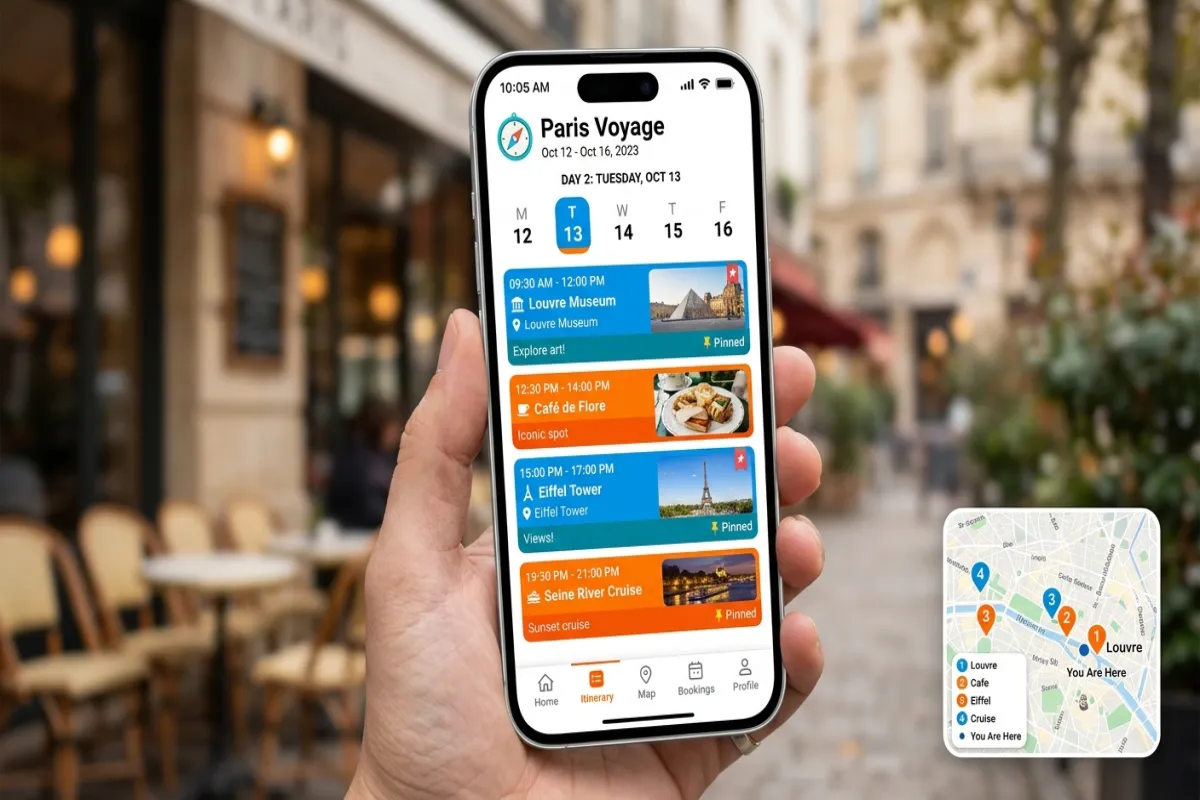
The best AI trip planners go beyond just listing attractions. They factor in geographic proximity (so you are not zigzagging across a city), opening hours, travel time between stops, and your personal preferences like food restrictions or mobility needs.
Not all AI planners are created equal, though. Some are full planning platforms with maps, calendars, and collaboration tools. Others are chat interfaces that spit out text you then have to organize yourself.
Top 5 AI Travel Planners Compared (2026)
Here is how the five most popular AI travel planners stack up after hands-on testing.
| Feature | Yopki | ChatGPT | Layla AI | Wanderlog | TripIt |
|---|---|---|---|---|---|
| AI Itinerary Generation | Yes – personalized | Yes – text only | Yes – chat-based | Limited | No |
| Visual Calendar | Drag-and-drop | No | No | Yes | Timeline only |
| Interactive Map | Yes – all activities pinned | No | No | Yes | No |
| Document Organizer | Yes | No | No | No | Yes – core feature |
| Collaboration/Sharing | Real-time sharing | Share chat link | No | Yes | Yes |
| Mobile App | iOS + Android | iOS + Android | Web only | iOS + Android | iOS + Android |
| Free Tier | Yes – generous | Yes – limited | Yes | Yes – limited | Free + Pro ($49/yr) |
| Best For | All-in-one planning | Research/brainstorming | Chat-style planning | Road trips | Business travelers |
1. Yopki – Best All-in-One AI Travel Planner
Yopki is the tool I keep coming back to. It combines AI itinerary generation with a visual drag-and-drop calendar, an interactive map that shows every activity pinned to its location, a document organizer for boarding passes and hotel confirmations, and real-time trip sharing with travel companions.
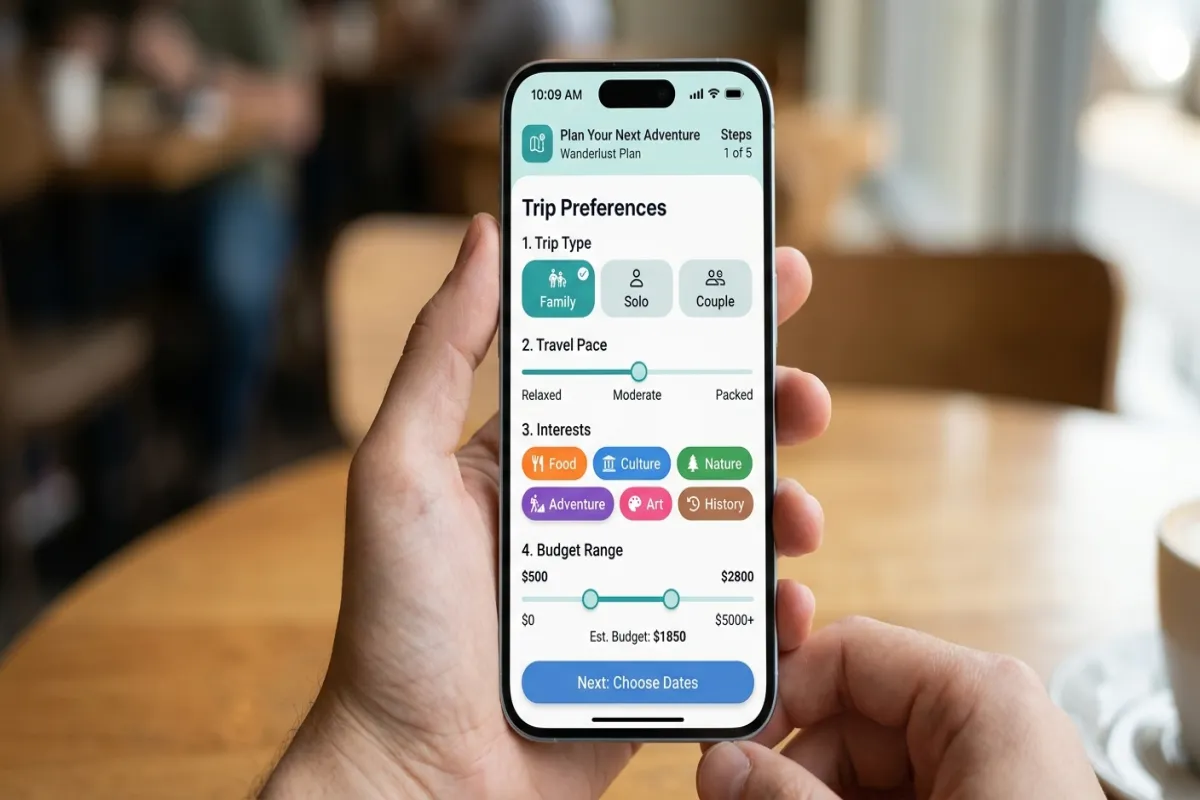
When I planned my Japan trip on Yopki, it asked about my kids’ ages, our interest in cultural experiences vs. outdoor activities, our pace preference (relaxed vs. packed), and our food preferences. The result was a realistic daily schedule that accounted for travel time between neighborhoods, included kid-friendly restaurants near each activity, and built in downtime after lunch.
What sets it apart:
- AI generates the plan, then you fine-tune it on a visual calendar
- Map view shows your entire day’s route so you can spot inefficient backtracking
- Document organizer keeps boarding passes, hotel confirmations, and reservations in one place
- Share your trip with a link so everyone in your group sees the same plan
- Free to start with no credit card required
Limitations: Newer platform, so the community of shared itineraries is still growing.
2. ChatGPT – Best for Research and Brainstorming
ChatGPT is excellent at answering open-ended travel questions. “What are the best neighborhoods in Tokyo for families?” or “What should I know about taking the bullet train with kids?” It handles these brilliantly.
But when I asked it to plan my 7-day Japan trip, I got a long text response. No map. No calendar. No way to rearrange days or share the plan with my wife. I spent another 90 minutes copying the suggestions into a spreadsheet and verifying addresses.
What it does well:
- Deep knowledge base for destination research
- Great at answering specific questions (“Is the JR Pass worth it for 7 days?”)
- Can adjust suggestions in real-time through conversation
- Free tier available
Limitations: Text-only output. No maps, no calendar, no collaboration tools. You have to do all the organizing yourself.
3. Layla AI – Best Chat-Based Planner
Layla AI takes a conversational approach to trip planning. You chat with the AI like you would with a travel-savvy friend, and it builds your itinerary through the conversation. The interface is clean and the suggestions are solid.
For my Japan test, Layla generated reasonable daily plans. It understood family-friendly preferences and suggested age-appropriate activities. However, there is no map view to visualize your route and no way to reorganize the plan with drag-and-drop.
What it does well:
- Natural conversation-based planning
- Good at understanding vague preferences (“we like food but not fancy restaurants”)
- Clean, simple interface
Limitations: No visual calendar or map. Limited sharing options. Web-only with no dedicated mobile app.
4. Wanderlog – Best for Road Trips
Wanderlog shines for road trips and driving itineraries. Its map-first interface lets you plot stops along a route, and it calculates driving times between each one. The trip planning tools are solid, with a good calendar view and collaboration features.
Its AI capabilities are more limited compared to Yopki or ChatGPT. It is better at organizing a plan you already have than generating one from scratch. For my Japan trip, the AI suggestions were generic and did not account for my family’s specific needs.
What it does well:
- Excellent map interface with route optimization
- Strong collaboration features for group trips
- Good for road trips and multi-city trip planning driving itineraries
Limitations: AI generation is basic. Free tier is restricted. Less useful for international trips without driving.
5. TripIt – Best for Business Travelers
TripIt is the oldest tool on this list, and it solves a different problem. Forward your booking confirmation emails to TripIt, and it automatically creates a timeline of your trip. It is a document organizer first and a planner second.
There is no AI itinerary generation. You will not get activity suggestions or restaurant recommendations. But if you already know what you are doing and just need everything organized in one place, TripIt does that well.
What it does well:
- Automatically parses booking confirmation emails
- Clean timeline view of flights, hotels, and car rentals
- TripIt Pro adds real-time flight alerts and seat tracking
Limitations: No AI generation. No activity planning. Pro version costs $49 per year. Focused on logistics, not experiences.
ChatGPT vs. Dedicated AI Travel Planners
This is the question I get asked most: “Why would I use a dedicated AI travel planner when ChatGPT is free?”
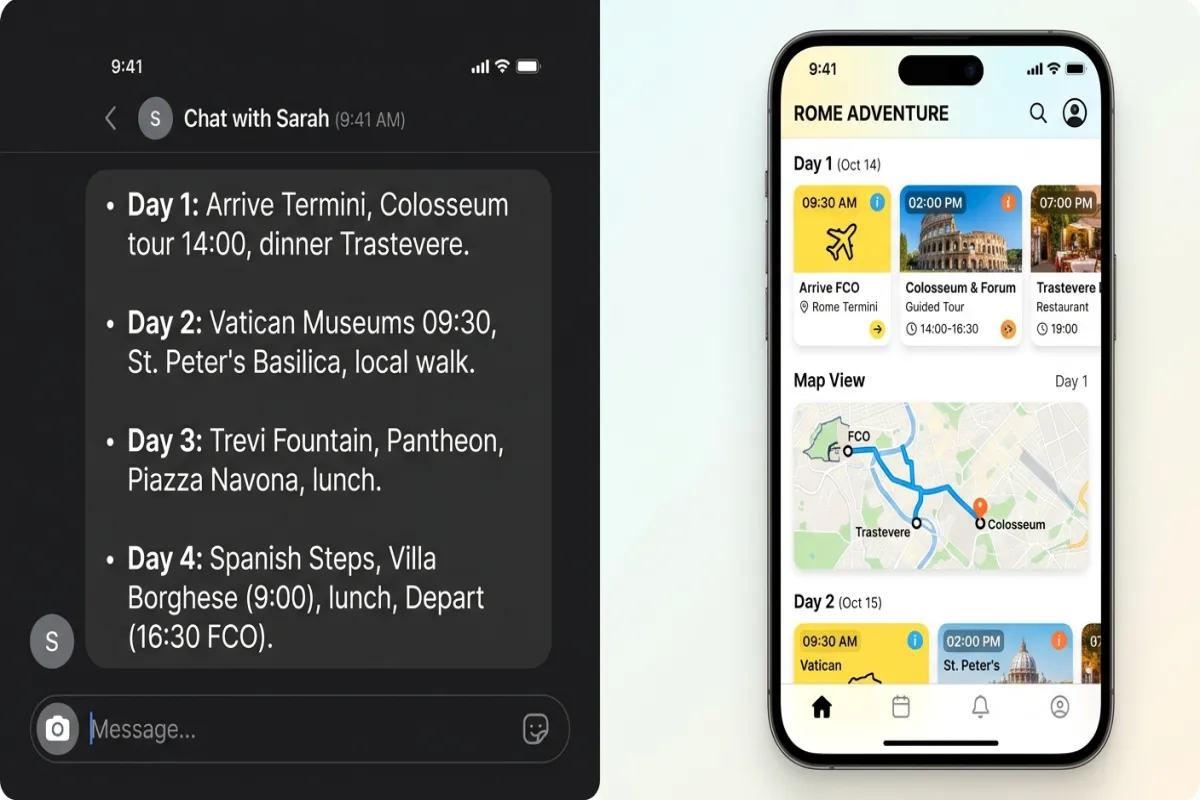
Fair question. Here is the honest answer.
ChatGPT wins at:
- Open-ended research (“What is the cheapest time to visit Japan?”)
- Answering specific travel questions with nuanced context
- Generating creative ideas you had not considered
- Flexibility, since you can ask it literally anything
Dedicated planners like Yopki win at:
- Turning ideas into an actionable, visual plan
- Showing your activities on a map so you can spot routing problems
- Letting you drag and drop to rearrange your schedule
- Sharing a live itinerary with everyone in your group
- Storing documents, confirmations, and reservations alongside your plan
- Accessing your itinerary offline on your phone during the trip
The smart approach is to use both. Use ChatGPT for the research phase, figuring out where to go, what to prioritize, and what to skip. Then use Yopki to turn those ideas into a structured, shareable, visual itinerary.
How AI Itinerary Generators Actually Work
Understanding how these tools work helps you get better results from them.
AI travel planners use large language models (the same technology behind ChatGPT) combined with travel-specific data. When you enter your trip details, the AI processes several factors:
- Geographic clustering: Grouping nearby attractions so you spend less time in transit
- Time optimization: Scheduling indoor activities for rainy afternoons and outdoor activities for mornings
- Popularity and crowd data: Suggesting less-crowded times for popular attractions
- Opening hours and seasonal availability: Making sure you are not sent to a place that is closed
- Travel pace: Adjusting the number of activities per day based on your preferences
The best planners combine this AI layer with a visual interface. The AI handles the complex logistics. You handle the personal preferences and final decisions.
Best Use Cases for AI Travel Planners
Family Vacations
Family trips are where AI planners add the most value. Juggling nap times, kid-friendly restaurants, age-appropriate activities, and realistic walking distances is complicated. An AI planner accounts for all of these variables and builds a schedule that actually works with children.
Yopki lets you specify your children’s ages and automatically adjusts the pace and activity suggestions. No more planning a packed museum day only to realize your 4-year-old has a 90-minute attention span.
Multi-City Trips
A 10-day trip across three cities has dozens of logistics decisions. When to move between cities. Which hotel to book in each location. How to sequence activities to avoid backtracking. AI planners handle this complexity in seconds, optimizing for minimum transit time and maximum time at destinations.
Group Travel
Planning a trip with 6 friends usually means a group chat full of conflicting opinions and zero decisions. A shared itinerary on a platform like Yopki gives everyone visibility into the plan and a way to suggest changes without the chaos.
First-Time Visitors
Visiting a new destination for the first time? AI planners have an edge because they draw on data about what thousands of travelers have enjoyed, which neighborhoods are walkable, and how to sequence a first visit for maximum impact.
Weekend Getaways
Short trips have zero margin for wasted time. Spending 2 hours on your first morning figuring out what to do means losing 25% of a single day. An AI planner gives you an optimized 2-3 day plan immediately, so you hit the ground running the moment you arrive. For a 48-hour trip, that planning head start is worth more than any single activity on your list.
Budget-Conscious Travel
AI planners can help you save money by clustering free and low-cost activities together, reducing transit expenses through better routing, and identifying free museum days or happy hour windows. When I ran my Japan trip through Yopki, it suggested visiting Meiji Shrine (free) in the morning, then walking to nearby Harajuku for street food ($5-8 per item) instead of a sit-down restaurant. Small optimizations like these add up to significant savings over a week-long trip.
Common Mistakes When Using AI Travel Planners
After testing these tools extensively, I see the same mistakes coming up repeatedly. Avoid these and you will get dramatically better results.
Accepting the First Output Without Editing
The AI gives you a solid starting point, not a finished product. I have never once used an AI-generated itinerary without making at least 5-10 changes. Swap out activities that do not excite you. Adjust the pace to match your energy. Add places friends have recommended. The AI does the heavy lifting, but the personal touches are what make the trip yours.
Being Too Vague with Your Inputs
“Plan a trip to Italy” gives the AI almost nothing to work with. “Plan a 7-day trip to Rome and the Amalfi Coast for two adults who love food, prefer a relaxed pace with 3-4 activities per day, and want at least one cooking class” gives it everything it needs. More detail in, better plan out.
Ignoring the Map View
If your AI planner has a map feature, use it. I caught routing problems on almost every itinerary by looking at the map. One plan had me going from Shinjuku to Asakusa and back to Shibuya, a backtracking detour that would have wasted 45 minutes on the subway. The map made it obvious. The calendar alone does not show this.
Not Sharing the Plan with Travel Companions
A trip plan that only one person has seen is a trip plan that will cause arguments. Share it early. Get buy-in. Let people swap activities or add their own. Collaborative planning tools exist for a reason. Use them.
Skipping the Verification Step
AI is good, but not perfect. Verify opening hours for your top 3-5 must-visit spots. Confirm that restaurants are still open. Check if any attractions require advance booking. This 15-minute verification step has saved me from showing up to closed venues on at least three trips.
How to Get the Best Results from an AI Travel Planner
The quality of your AI-generated itinerary depends heavily on what you put in. Here are the tips that made the biggest difference in my testing.
Be Specific About Your Preferences
Instead of “I like food,” say “we want to try at least one local ramen shop and one sushi restaurant per day, nothing over $30 per person.” Instead of “we like culture,” say “we want 1-2 temple or shrine visits in Kyoto, but our kids lose interest after 45 minutes.”
Set Your Pace
Tell the AI how many activities per day you realistically want. Most travelers overpack their itineraries. If you are traveling with kids or prefer a relaxed pace, specify 2-3 major activities per day with buffer time between them.
Mention Constraints
Have a dinner reservation on Thursday? Arriving at 3 PM on your first day? Need to be near a pharmacy? These constraints help the AI build around your fixed points rather than generating a generic plan you have to rebuild.
Iterate and Adjust
Treat the AI output as a strong first draft, not a final plan. Move things around. Swap out activities that do not interest you. Add personal recommendations from friends. The AI saves you 80% of the planning work. You handle the last 20% to make it yours.
Verify Key Details
AI can occasionally suggest venues that have closed or list incorrect opening hours. Double-check reservations, ticketing requirements, and seasonal closures before your trip. This takes 15-20 minutes and can save you from a wasted afternoon.
Planning Your Trip: Step by Step
Here is the workflow I recommend after testing all of these tools.
- Research phase (ChatGPT or Google): Figure out your destination, dates, and budget. Get inspiration for neighborhoods, foods, and experiences.
- Generation phase (Yopki): Enter your trip details and let the AI build a day-by-day itinerary. Review the map view to make sure the routing makes sense.
- Customization phase: Drag and drop activities on the calendar. Add your own finds. Remove anything that does not excite you.
- Share and collaborate: Send the trip link to your travel companions. Let everyone see the plan and suggest edits.
- Organize documents: Upload boarding passes, hotel confirmations, and restaurant reservations to your document organizer.
- Go: Pull up your itinerary on your phone. Everything is there, online or offline.
Need a starting framework? Grab a free itinerary template to see what a well-structured trip plan looks like before you build your own.
What to Look for in an AI Travel Planner
If you are evaluating AI planners, here are the features that actually matter based on my testing.
- Personalization depth: Does it ask about your interests, pace, and constraints, or just your destination and dates?
- Visual planning tools: Can you see your activities on a map? Can you drag and drop on a calendar?
- Collaboration: Can you share the itinerary with others and let them edit it?
- Document storage: Can you keep boarding passes and confirmations alongside your plan?
- Mobile access: Can you access your itinerary on your phone, offline, during the trip?
- Free tier quality: Is the free version genuinely useful, or is it a teaser for a paid plan?
For more help choosing the right tools, see our guide to the best travel planning apps and our complete walkthrough on how to plan a trip.
Frequently Asked Questions
What is the best AI travel planner?
For most travelers, Yopki is the best all-in-one AI travel planner. It combines AI itinerary generation with a visual calendar, interactive map, document organizer, and collaborative sharing. ChatGPT is better for open-ended research, while Layla AI focuses on chat-based planning. The best choice depends on whether you want a complete planning tool or just itinerary suggestions.
Is an AI trip planner free?
Many AI trip planners offer free tiers. Yopki is free to start and includes AI itinerary generation, calendar planning, and map views at no cost. ChatGPT’s free tier can generate trip suggestions but lacks travel-specific features like maps or booking integration. Wanderlog and TripIt also have free versions with limited features.
Can you use ChatGPT to plan travel?
Yes, ChatGPT can suggest destinations, draft rough itineraries, and answer travel questions. However, it outputs plain text. You cannot drag activities onto a calendar, see them on a map, or share a live itinerary with travel companions. Dedicated AI travel planners like Yopki take the same AI generation and wrap it in visual planning tools, maps, and collaboration features.
What is the best free AI planner?
Yopki offers the most complete free AI travel planning experience: AI-generated itineraries, drag-and-drop calendar, interactive map planner, and document organizer, all free to start. ChatGPT’s free tier is useful for brainstorming but requires manual work to turn suggestions into an actionable plan.
How does an AI itinerary generator work?
An AI itinerary generator takes your inputs (destination, travel dates, interests, budget, group size) and uses large language models to create a day-by-day itinerary. The AI considers geographic clustering so you are not zigzagging across a city, opening hours, travel time between stops, and the relative popularity of attractions. You then customize the generated plan to your preferences.
Are AI travel planners accurate?
AI travel planners are generally good at suggesting popular attractions, logical routing, and balanced daily schedules. However, they can occasionally suggest closed venues, outdated prices, or incorrect opening hours. The best approach is to use AI to generate a strong starting framework, then verify key details like reservations, hours, and pricing before your trip.
How far in advance should I use an AI travel planner?
Start planning 2-4 weeks before your trip for domestic travel and 1-2 months before for international trips. This gives you enough time to generate your itinerary, customize it, book any reservations that require advance notice, and share the plan with your travel companions. That said, AI planners also work well for last-minute trips. You can generate a solid 3-day itinerary in 15 minutes, even the night before you leave.
Can AI travel planners book flights and hotels for me?
Most AI travel planners focus on itinerary creation rather than booking. They help you decide what to do, where to go, and how to sequence your days. For booking flights and hotels, you still use the usual platforms (Google Flights, airline websites, hotel sites, or OTAs). Some planners are starting to integrate booking links, but the real value of AI planners is in the planning and organization, not the purchasing.